

Podcasting continues to emerge as one of the strongest ways to share stories, share ideas, and showcase expertise online. Whether you are an absolute beginner with your first-ever show or a professional seeking high-quality sound akin to a studio, the proper recording or editing software can significantly impact your success.
The best software in 2025 will enable you to capture high-quality audio for your podcasts and provide an intuitive way to edit, remove unwanted background noise, and add professional effects.
In this guide, we will share the 8 best podcasting recording and editing software for beginning and professional podcasters alike. While some of these tools are free, others are more advanced production platforms with more capabilities. Choosing from a blend of podcasting tools is the easiest way for you to develop polished, engaging.
How to Choose Podcasting Software?
Finding the right software for podcasting is one of the most significant decisions you’ll make when it comes to the quality of content you create for the podcast. There are numerous options available, and you should focus on the features that will help you achieve the goals of your podcasts, whether you are a novice or an expert.
In 2025, approximately 584.1 million people in the world listened to podcasts. It’s never been more crowded in terms of competition for attention. You can count on your podcast always being clearly audible with reliable software that makes everything easier, including distribution.
When evaluating your podcasting software options, consider factors such as user-friendliness, audio quality, editing capabilities, and integrations with distribution channels.
The latest podcasting software products also have AI Writing features that eliminate the time needed for transcripts, show notes, and even social media snippets can be created automatically. I also find that using AI Writing features and enhancements helps immensely with SEO and reaching audiences.
At the bottom line, what you want is a podcasting software that supports your workflow, enhances audio quality, and makes it easier for you to keep your listeners up to date with consistent episodes.
Best Podcast Recording & Editing Tools
1. Riverside
Riverside is an all-in-one podcast recording platform trusted by professionals, marketers, and creators who want reliable, high-quality production without technical complexity. It’s the same tool we use for Create & Grow Podcast, where we record conversations with SEO experts, SaaS founders, and digital marketers.
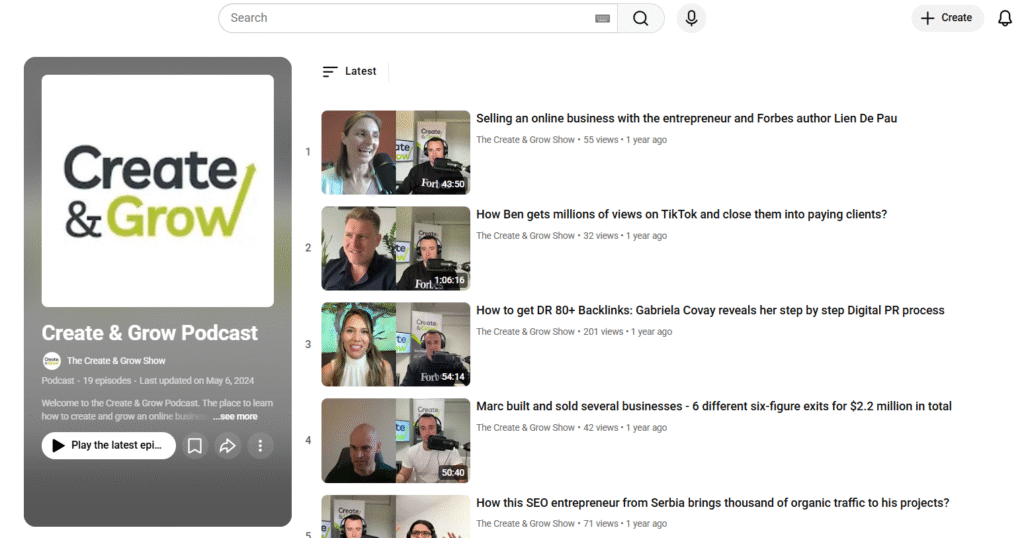
Source: Create & Grow Podcast
Key Features:
Riverside lets you record up to 4K video and lossless audio directly in your browser, even if your guests have internet connectivity issues. Each participant is recorded individually on their device, ensuring clear, uninterrupted audio quality.
Riverside also features AI-powered transcription, automatic cloud backup, and a built-in editor, making it faster and easier to perfect your professional podcast.

Source: Riverside
Pros:
- Broadcast-quality audio and video.
- Guests can join with just one click.
- Record locally to avoid delays or interruptions.
- The easiest way to edit and collaborate.
- Best service for remote interviews and professional podcasting.
Cons:
- The premium plan can be a bit expensive for beginners.
- If you have a slow internet connection, uploading large video files can take a while.
2. Audacity
Audacity is a podcast audio recording and editing software. It is a free, open-source option that is perfect for starting out or for podcasters looking for a lightweight option with all the essentials. Audacity is simple to use, and it offers a user-friendly interface that makes recording, editing, and exporting audio in various formats simple.
Key Features:
Audacity offers podcasters a wide range of features, including live audio recording with a microphone, multi-track editing, and basic tools like cut, copy, and mix. It also comes packaged with various built-in effects (e.g, noise reduction, equalization, and compression) that will allow for a quick improvement in sound quality.
It supports third-party plugins (VST, LADSPA, Nyquist) that offer extended features and allow for exporting in the more popular formats like MP3, WAV, and OGG. This flexibility is functional depending on where podcasters plan to publish the audio.

Source: Audacity
Pros:
- 100% free open-source software.
- Easy-to-use, user-friendly interface.
- Cross-platform (Windows/macOS/Linux) capable.
- Large community access to tutorials and plugins.
Cons:
- Old interface capabilities compared to premium software.
- Loss of advanced editing capabilities.
- No built-in features for recording a remote or guest interview.
3. Adobe Audition
Adobe Audition is a professional audio workstation used by podcasters, training developers, musicians, sound engineers, and many more. A part of the Adobe Creative Cloud product suite, it offers a range of uses for you to record audio, edit audio, mix audio, and restore audio.
Key Features:
Adobe Audition has many advanced features for multitrack editing, waveform editing, spectral display, and more that afford users a greater amount of power and control over their audio production process.
It comes standard with noise reduction tools, cleaning features, and mixing tools to really elevate the audio quality for a completed, polished, broadcast podcast episode. In addition, seamless integration with any other Adobe product makes working with other tools provided more comfortable.
Adobe Audition also features batch processing, which makes it usable, efficient, and practical for a professional workflow. Its vast selection of effects, coupled with real-time previews (in the last version at least), means easy adjustments and clear audio control.

Source: Adobe Audition
Pros:
- Contains professional features for recording and editing.
- Produces excellent tools for noise reduction & audio cleaning.
- Seamless integration with Adobe Creative Cloud.
- Great for both autonomous podcasters and production teams.
Cons:
- Paid subscription service (no free version available).
- An intermediate to advanced user interface that may require a learning curve for beginners.
- Heavily dependent on resources, it may bog down older computer machines manufactured by HP, Lenovo, etc.
4. GarageBand
GarageBand is a free digital audio workstation (DAW) created by Apple for macOS and iOS. Many people may associate GarageBand with music creation; however, it is also a great entry-level tool for podcasters.
GarageBand comes with everything you need as a podcaster to record, edit, and produce a podcast episode, with no need for deep technical understanding. GarageBand offers a simple drag-and-drop UI and comes with a range of built-in tools.
Key Features:
GarageBand includes multi-track recording and editing, allowing you to record, edit, and monitor voice, music, and effects all in one single project. You’ll have access to many sound effects and royalty-free music loops.
GarageBand offers audio filters, so you can adjust EQ, compression, and reverb to produce quality sound. GarageBand is built for Apple devices, allowing you to seamlessly integrate all your other apps and export your project in seconds.

Source: GarageBand
Pros:
- Entirely free for everyone on macOS and iOS.
- Easy UI, perfect for beginners.
- Filled with music loops, sound effects, and audio filters.
Cons:
- Only available on macOS and iOS.
- It has fewer advanced editing features than pro software.
- Not specifically designed for a podcasting flow.
5. Reaper
Reaper is an inexpensive and very powerful Digital Audio Workstation (DAW) used by an increasing number of podcasters, musicians, and audio professionals. Although Reaper is less common among free tools, it offers many higher-priced tools and features in an affordable package.
Key Feature:
If you can think it, you can do it in Reaper. Reaper supports unlimited multitrack recording, editing, and mixing with a fully customizable interface. It fully supports third-party plugins (VST, AU, DX) with its powerful audio routing capabilities and automation.
It is lightweight, runs comfortably on most hardware, and you can simply render a project or file in several formats. Its customization options and flexibility accommodate podcasters who may want a more customized workflow to set up for their long-term podcasting needs.

Source: Reaper
Pros:
- One-time low-cost license fee.
- Lightweight and efficient software means it works on most computers.
- Customizable interface and workflow.
- Supports unlimited tracks and a wide range of plugins.
Cons:
- May have a more difficult learning curve for individuals brand new to DAW software.
- Interface may feel ‘cheap’ compared to higher-priced DAW options.
- A more general-purpose DAW that incorporates more features not tailored solely for podcasting.
6. Hindenburg Journalist
Hindenburg Journalist is a digital audio workstation purposely designed for podcasters, radio journalists, and spoken word artists. The purpose of Hindenburg Journalist differs from that of an all-purpose DAW, as it is geared toward voice recording and storytelling.
Overall, Hindenburg Journalist is one of the best tools on the market for creating high-quality audio podcasts that allow podcasters to create professional-sounding podcasts.
Key features:
Automatic audio leveling, voice profiling, and noise reduction create a seamless experience normally found in broadcast-quality audio. The multitrack editor allows podcasters to arrange interviews, music, and sound effects together quickly.
The organization of your clipboard and the inclusion of chapter markers provide a plan to move efficiently through your podcast, producing smooth transitions and quality audio.

Source: Hindenburg Journalist
Pros:
- Tailored specifically for podcasting and voice production.
- Automatic audio leveling is helpful for professional sound.
- Very simple, tidy, user-friendly interface with a little learning curve.
- Ability to publish directly to a podcast hosting service.
Cons:
- Paid software with either subscription or license fees.
- Limited music production features compared to DAWs.
- Not flexible for users who like heavy customization.
7. Logic Pro X
Logic Pro X is Apple’s professional digital audio workstation, and it has many detailed tools to record, edit, and produce great-sounding audio. Logic Pro X is primarily intended for music producers but is also a very viable option for podcasters who want to have control over their audio and their production process.
Key Features:
Logic Pro X offers unlimited tracks for both audio and MIDI, advanced mixing and mastering tools, and many effects, loops, and plugins. The Flex Time and Flex Pitch features enable podcasters to delay or adjust audio to a more favorable timing, allowing for precise pitch adjustments.
Logic Pro X’s interface is easy to navigate and offers the workflow required to see a project through to completion. Logic Pro is also well-integrated into the Apple ecosystem, meaning not only can it run natively on macOS, but you can also export your projects in a variety of formats efficiently.

Source: Logic Pro X
Pros:
- Professional-level tools and effects.
- Ability to record an unlimited number of tracks while offering mixing capability.
- Flying through an extensive library of loops, sounds, and plugins.
- Integration through the macOS ecosystem.
Cons:
- Only available on macOS.
- Paid software with relatively high upfront costs.
- It may be difficult for beginner users to learn.
8. Descript
Descript is a powerful all-in-one podcasting platform and video editor that will change how creators experience working with audio. Instead of working with waveforms, Descript allows users to edit podcasts by editing text transcripts, which means it’s one of the most powerful yet also easiest to learn tools for modern podcasters.
Key Features:
Descript transcribes your audio automatically, and unlike waveforms, you edit recordings as if you are editing text. It has many additional features, such as filler word removal, overdub voice cloning, multitrack editing, built-in screen recording, publishing options to podcast hosting services, and even AI tools to help with production and post-production tasks.

Source: Descript
Pros:
- Edit audio by editing text transcripts.
- Powerful AI features like overdub and filler word removal.
- Easy to use for novices.
- Integrates well to create publishable podcasts by collaborating with others.
Cons:
- Subscription is required for full features.
- Some tools require an internet connection.
- Less control over deep technical editing compared to other audio editing software (DAW).
Expert tip
Descript is a podcast recording and editing platform that makes creating content as simple as editing a document, so it’s perfect for users with little to no editing experience.

9. Zencastr
Zencastr is a browser-based podcast recording platform focused on remote interviews and high-quality audio. You can record multiple guests on separate tracks, avoiding complicated software, which makes it an ideal solution for content creators who frequently record or collaborate with remote speakers.
Key Features:
Zencastr records only high-fidelity audio locally from each participant and then uploads the files to the cloud for syncing. With this setup, you’ll have studio-quality sound, even if your participants are experiencing spotty internet service.
Zencastr includes integrated post-production tools, automatic volume leveling, built-in noise reduction features, and cloud storage for customers. Zencastr supports video podcasting and built-in monetization and distribution features to maximize creators’ time and efficiency, plus all of its product aspects are integrated and easy to use.

Source: Zencastr
Pros :
- High-quality remote recording with separate tracks for each guest.
- Browser-based, no complicated installations.
- Integrated post-production tools and cloud storage.
- Covered both audio and video podcasting.
Cons :
- Unstable internet makes for poor sessions.
- Limited offline capability.
- Subscription for advanced features.
Conclusion
In 2025, the podcast recording and editing software you choose will depend on what your goals are, how much you’re willing to spend, and your technical level. You can find quality free tools like Audacity and GarageBand or professional podcaster platforms like Adobe Audition, Logic Pro X, and Descript.
Everything has its advantages and disadvantages. Ultimately, the best course software for you is the one that allows you to produce consistent, high-quality episodes for your audience, so your listeners remain engaged.
Frequently Asked Questions