

Quick answer: The best AI tools for social media scheduling are Buffer, Hootsuite, SocialBee, Sprout Social, Later and PosterMyWall. Buffer is the simplest and cheapest for small teams, Hootsuite and Sprout Social are the most complete for agencies and larger teams, SocialBee recycles evergreen posts by category, Later is best for Instagram and TikTok, and PosterMyWall helps you design the posts too. Their AI features write captions, suggest hashtags and pick the best time to post.
Black Friday Social Media Scheduling Tools Deals 2026
Black Friday 2026 falls on 27 November and Cyber Monday on 30 November. This list covers 13 social media scheduling tools that ran a Black Friday or Cyber Monday offer in 2025. For each one you get what the product does, last year’s offer, the regular price the vendor shows today and what to check before you buy.
Black Friday 2026 offers for social media scheduling tools are not announced yet. This list shows the Black Friday and Cyber Monday 2025 offers we could verify, each with its source, so you know roughly what to expect. Tools with no verifiable 2025 offer are left out.
- 13 products are listed, each with the source where the 2025 offer was seen.
- Largest 2025 discounts on this list: SocialBee (70%), Nuelink (65%), MagicPost (60%), Planly (60%).
- No vendor on this list has published a 2026 offer yet. Most are announced in November.
- Last checked: 5 October 2026. There are no affiliate links in this list.
All social media scheduling tools deals in one table
Select a name to jump to the details.
| Product | Type | 2025 Black Friday deal | 2026 status | Regular price today |
|---|---|---|---|---|
| SocialBee | Social scheduling | 70% off for 3 months on monthly plans or 50% off yearly subscriptions | not announced yet | from $29 per month (Bootstrap, USD, monthly billing) or $24.92 per month billed annually; 14-day free trial, no free plan listed |
| CoSchedule Social Calendar | Social scheduling | $67 per user per year (regularly $228) | not announced yet | from $29 per month billed annually or $39 billed monthly (Starter, USD); free calendar with limited posts |
| Nuelink | Social scheduling | 30% off monthly plans, up to 65% off yearly plans | not announced yet | Standard: $192 per year ($16 per month equivalent, USD, yearly billing with the current anniversary offer); 7-day free trial |
| MagicPost | LinkedIn content tool | 60% off yearly plans, 30% off monthly plans (until 8 Dec 2025) | not announced yet | Growth: $49 per month billed monthly or $29 per month billed annually; Creator: $69 monthly (USD); free trial without credit card |
| Social Champ | Social scheduling | 50% off annual plans, 40% off monthly plans for 3 months (until 31 Dec 2025) | not announced yet | free plan (3 social accounts, 15 scheduled posts); Standard $29 per month billed monthly or $23.20 per month billed yearly (USD) |
| ContentStudio | Social scheduling | 40% off the first annual plan (until 30 Nov 2025) | not announced yet | Standard $29 per month billed monthly or $19 per month billed annually (USD); Advanced $69 per month; 7-day free trial |
| PostNitro | Social content design | Recurring 40% off annual plans, 20% off monthly plans (1 – 30 Nov 2025) | not announced yet | from $15 per month or $180 per year (Starter, USD); free plan available |
| Planable | Social media collaboration | 20% off (Nov 19 – Dec 3, 2025) | not announced yet | from $33 per workspace per month (Basic, USD); free trial of 50 posts with no time limit |
| Circleboom | Social media management | 50% off all products and plans (Nov 24 – Dec 2, 2025) | not announced yet | see vendor site |
| Planly | Social scheduling | 40% off monthly and 60% off annual subscriptions (Nov 25 – Dec 2, 2025) | not announced yet | from $15 per month billed monthly or $10 per month billed annually (Individual, USD); 14-day trial, no free plan |
| Taplio | LinkedIn growth tool | 30% off all plans for new users (Nov 28 – Dec 5, 2025) | not announced yet | from $39 per month (USD, as stated on the pricing page); 7-day free trial |
| SocialHQ | 50% off first invoice for all plans (Nov 15 – Dec 31, 2025) | not announced yet | see vendor site | |
| PostSyncer | Social scheduling | 20% off for a year (Until Dec 31, 2025) | not announced yet | from $29 per month billed monthly or $24 per month billed yearly (Starter); 7-day free trial, no free plan |
Social scheduling
SocialBee
SocialBee is a social media management tool for creating, scheduling and publishing posts across 10 platforms from one dashboard. It organizes content into categories on a visual calendar, can reshare evergreen posts, and includes AI writing help, analytics, a social inbox and approval workflows.

socialbee.com, captured October 2026.
- Scheduling and publishing across 10 social platforms
- Content categories with evergreen post resharing
- AI content creation with 1000+ prompts
- Analytics dashboards with PDF reports
- Best for
- Solopreneurs, small businesses and agencies that manage several social profiles and reuse evergreen content.
- Regular price
- from $29 per month (Bootstrap, USD, monthly billing) or $24.92 per month billed annually; 14-day free trial, no free plan listed (vendor pricing page, checked 5 October 2026)
- Before you buy
- Check the social profile and user limits per plan, and note the 30-day money-back guarantee listed on the pricing page.
Visit SocialBee2025 offer seen at: socialbee.com
Social scheduling
CoSchedule Social Calendar
CoSchedule Social Calendar is a tool for planning, scheduling and publishing social media posts from one calendar. It also shows blogs and events alongside social messages, includes a social inbox for replying to comments and direct messages, and offers reports to measure results.

coschedule.com, captured October 2026.
- Calendar for planning and scheduling social posts
- Social inbox for messages, comments and replies
- Custom social reports
- Message approvals on the Professional plan
- Best for
- Solo marketers, small marketing teams and agencies that plan social posts alongside other content.
- Regular price
- from $29 per month billed annually or $39 billed monthly (Starter, USD); free calendar with limited posts (vendor pricing page, checked 5 October 2026)
- Before you buy
- Check included users and social profiles, since extra profiles cost $5 per month each and X profiles are billed separately.
Visit CoSchedule Social Calendar2025 offer seen at: moosend.com
Social scheduling
Nuelink
Nuelink is a social media scheduling and automation platform that publishes to 12 networks from one dashboard. Besides a visual calendar and bulk upload, it can post automatically from stores, blogs, podcasts and RSS feeds, recycle evergreen content and manage comments.

nuelink.com, captured October 2026.
- Publishing to 12 platforms from one dashboard
- Auto-posting from stores, blogs, podcasts and RSS feeds
- Evergreen content recycling
- Comment inbox and analytics
- Best for
- Ecommerce sellers, bloggers, podcasters and agencies that want social posting to run automatically.
- Regular price
- Standard: $192 per year ($16 per month equivalent, USD, yearly billing with the current anniversary offer); 7-day free trial (vendor pricing page, checked 5 October 2026)
- Before you buy
- Check channel, brand and member limits per plan, and whether the price shown is a temporary yearly promotion; 30-day money back is stated.
Visit Nuelink2025 offer seen at: ampifire.com
LinkedIn content tool
MagicPost
MagicPost is a LinkedIn management platform that generates posts in the user’s voice with AI. It also creates visuals and carousels, schedules and publishes posts, tracks analytics and engagement, detects leads from post interactions and supports multiple accounts for agencies and teams.

magicpost.in, captured October 2026.
- AI post generation in your own voice
- Visual and carousel creation
- Scheduling, analytics and engagement tracking
- Lead detection from post interactions
- Best for
- Solo creators, ghostwriters, LinkedIn agencies and sales teams that post on LinkedIn regularly.
- Regular price
- Growth: $49 per month billed monthly or $29 per month billed annually; Creator: $69 monthly (USD); free trial without credit card (vendor pricing page, checked 5 October 2026)
- Before you buy
- Check that unlimited AI post generation needs the Creator plan, and that Agency pricing is per seat with a five-seat minimum.
Visit MagicPost2025 offer seen at: moosend.com
Social scheduling
Social Champ
Social Champ is a social media management tool for planning, publishing and reporting across more than 12 platforms from one place. It includes a content calendar, social inbox, analytics, social listening, approval workflows and an AI suite for captions, images and hashtags.

socialchamp.com, captured October 2026.
- Scheduling and publishing across 12+ platforms
- Social inbox with automated replies
- White-label reports in PDF, PPT and CSV
- Champ AI Suite for captions, images and hashtags
- Best for
- Agencies and marketing teams that manage many client accounts and need approvals and reports.
- Regular price
- free plan (3 social accounts, 15 scheduled posts); Standard $29 per month billed monthly or $23.20 per month billed yearly (USD) (vendor pricing page, checked 5 October 2026)
- Before you buy
- Check how many social accounts and users the plan includes, and whether you are on bundled or pay-per-profile pricing.
Visit Social Champ2025 offer seen at: helpcrunch.com
Social scheduling
ContentStudio
ContentStudio is a social media management platform with an AI agent that learns your brand, plans and creates content and publishes it across your channels. It includes a content calendar, bulk scheduling, a social inbox, analytics, competitor analysis and approval workflows for teams.

contentstudio.io, captured October 2026.
- Content calendar with smart and bulk scheduling
- AI Studio for captions, images and video
- Social inbox for comments and direct messages
- Analytics, competitor analysis and approval workflow
- Best for
- Creators, small businesses and agencies that publish to several social accounts and want AI help.
- Regular price
- Standard $29 per month billed monthly or $19 per month billed annually (USD); Advanced $69 per month; 7-day free trial (vendor pricing page, checked 5 October 2026)
- Before you buy
- Check the social account, workspace and user limits per plan; a 30-day money-back policy applies to first-time subscribers only.
Visit ContentStudio2025 offer seen at: ampifire.com
Social content design
PostNitro
PostNitro is an AI design tool for social media content. Users create carousels, single-image posts and animated videos from more than 100 editable templates, apply a brand kit automatically, and schedule or publish to LinkedIn, Instagram, TikTok, Threads and Facebook.

postnitro.ai, captured October 2026.
- Carousels, image posts and animated video from 100+ templates
- Brand kit with fonts, colors and logos
- Nitro Chat AI agent for writing and design
- Scheduling to LinkedIn, Instagram, TikTok, Threads and Facebook
- Best for
- Creators, social media managers and agencies that produce carousel posts often.
- Regular price
- from $15 per month or $180 per year (Starter, USD); free plan available (vendor pricing page, checked 5 October 2026)
- Before you buy
- Check that scheduling starts at Creator+ rather than Starter, the monthly download and AI token limits, and the seven-day refund window.
Visit PostNitro2025 offer seen at: ampifire.com
Social media collaboration
Planable
Planable is a social media management platform built around team collaboration. Teams create, plan and schedule content for nine networks, leave comments and annotations on posts, and move them through customizable approval workflows, with analytics, a social inbox and social listening available as add-ons.

planable.io, captured October 2026.
- Planning and scheduling across 9 platforms
- Customizable approval workflows
- Real-time comments and annotations
- Feed, calendar, grid and list views
- Best for
- Agencies and multi-brand or multi-location marketing teams that need client or manager approval before posting.
- Regular price
- from $33 per workspace per month (Basic, USD); free trial of 50 posts with no time limit (vendor pricing page, checked 5 October 2026)
- Before you buy
- Check that pricing is per workspace, the monthly post limit, and that Analytics and Social Inbox are paid add-ons.
Visit Planable2025 offer seen at: saleshandy.com
Social media management
Circleboom
Circleboom offers two social media tools. Its Twitter management tool covers account analytics, follower and following management, unfollower tracking and deleting posts, while Circleboom Publish schedules content to X, Instagram, LinkedIn, Facebook, Pinterest, Threads and Google Business Profile with AI post generation.

circleboom.com, captured October 2026.
- X account analytics and follower management
- Unfollower tracking and bulk delete services
- Scheduling to seven social platforms
- AI post generation and automation
- Best for
- Creators and brands that are active on X and also schedule posts to other networks.
- Regular price
- No list price was readable on the vendor’s site on 5 October 2026. Check the pricing page before you compare the discount.
- Before you buy
- Check which of the two products the deal covers, since Twitter management and Publish have separate plans and pricing pages.
Visit Circleboom2025 offer seen at: uplead.com
Social scheduling
Planly
Planly is a social media management tool for scheduling posts to several networks in advance. It adds analytics, a unified inbox for comments, messages and mentions, an AI content assistant, a bio link feature called Addto.bio and approval workflows for teams.

planly.com, captured October 2026.
- Post scheduling and automated publishing
- Unified inbox for comments, messages and mentions
- AI content assistant with monthly credits
- Approval flow on the Agency plan
- Best for
- Content creators, small businesses and agencies managing several social accounts on a modest budget.
- Regular price
- from $15 per month billed monthly or $10 per month billed annually (Individual, USD); 14-day trial, no free plan (vendor pricing page, checked 5 October 2026)
- Before you buy
- Check channel, user and post limits per plan, and that the lower rate is charged as one yearly payment.
Visit Planly2025 offer seen at: bolddesk.com
LinkedIn growth tool
Taplio
Taplio is an AI tool for growing a personal brand on LinkedIn. It writes posts in the user’s voice, schedules them, suggests people and posts worth engaging with, drafts comments, sends connection requests and messages to warm leads, builds carousels and tracks performance.

taplio.com, captured October 2026.
- AI post writing trained on 3M+ posts
- Batch scheduling at suggested times
- Engagement feed with AI-drafted comments
- Carousel creation and performance analytics
- Best for
- Founders, personal brands, agencies and sales leaders who use LinkedIn to find customers.
- Regular price
- from $39 per month (USD, as stated on the pricing page); 7-day free trial (vendor pricing page, checked 5 October 2026)
- Before you buy
- Check what each of the Starter, Growth and Pro plans includes, and the 30-day refund condition after the first payment.
Visit Taplio2025 offer seen at: aixploria.com
SocialHQ

thesocialhq.com, captured October 2026.
Visit SocialHQ2025 offer seen at: snov.io
Social scheduling
PostSyncer
PostSyncer is a social media management platform with one calendar for planning and publishing to more than 11 networks. It includes an AI studio for captions, images and videos, a unified comment inbox, analytics, approval workflows and API and MCP access for automation.

postsyncer.com, captured October 2026.
- One calendar for 11+ networks
- AI Studio for captions, images and videos
- Unified comment inbox and analytics
- REST API and MCP access
- Best for
- Solo creators, agencies managing several brands and developers who automate posting through an API.
- Regular price
- from $29 per month billed monthly or $24 per month billed yearly (Starter); 7-day free trial, no free plan (vendor pricing page, checked 5 October 2026)
- Before you buy
- Check social account, workspace and AI credit limits per plan, and that extra workspaces cost $19 per month each.
Visit PostSyncer2025 offer seen at: github.com
How to use these Black Friday deals
- Compare the sale price with the regular price in each card, not with a crossed-out list price. Some vendors show a first-year discount all year.
- Check what you pay at renewal. Many offers apply to the first billing period only.
- Match the plan limits (seats, sites, credits, contacts) to what you use today, then decide if a longer term is worth it.
- Lifetime plans depend on the vendor staying in business. Read the refund terms before you pay.
- Buying software for a site? See also our Black Friday WordPress deals and Black Friday hosting deals.
Questions about Black Friday social media scheduling tools deals
When do Black Friday social media scheduling tools deals start in 2026?
Black Friday is on 27 November 2026 and Cyber Monday on 30 November 2026. In 2025 many software vendors opened their offers one to two weeks earlier and kept them open into the first days of December.
Are these 2026 deals?
Not yet. Each card shows the 2025 offer and marks the 2026 status. We replace last year’s offer as soon as the vendor confirms a new one.
How are the deals checked?
Every offer links to the page where it was seen: the vendor’s own page or a dated roundup. Regular prices come from each vendor’s pricing page, read on 5 October 2026. Where a price was not readable, the card says so.
How can a vendor get listed?
Listing is free. Send the tool name, the offer, the dates and a link through the contact page.
More Black Friday deal lists
- All Black Friday deals lists
- Black Friday SaaS Marketing Tools deals
- Black Friday Email Marketing Platform deals
- Black Friday Marketing Automation Tools deals
- Black Friday Lead Generation Tools deals
- Black Friday CRM Tools deals
- Black Friday AI Content Writing Tools deals
- Black Friday WordPress deals
- Black Friday Hosting deals
Deals change and can end early. Check the final price on the vendor’s site before you buy.
Want your deal on this list?
Listing is free. Send us the tool name, the offer, the dates and a link. We check it and add it.
Contact usIf you’re looking to simplify your social media workflow, 2026 is the best time yet to do it. There’s an impressive wave of AI tools for social media scheduling with automation, content generation, and performance insights.
Despite being built for scheduling, many of the top AI social media tools pack in advanced features such as AI-generated captions, dynamic image creation, and smart posting suggestions.
If you’re after an at-a-glance look at the best AI-powered social media scheduling tools, you’ve come to the right place. Below, we’ve rounded up everything you need to know.
What Benefit does AI bring to Scheduling Social Media Posts?
Over the next three years, 92% of companies say they plan to increase their investments in AI. Using AI tools for social media scheduling is simply a better choice if you care about saving time and boosting performance. According to HubSpot’s report, 48% of social media marketers reuse or slightly adapt content across platforms. Many AI-powered social media management tools can generate fresh post ideas and repurpose content for different platforms.
AI scheduling tools can also analyze when your followers are actually online and suggest the best time to post. One of the most helpful things AI does is personalization. With the right prompt, AI tools can tailor your message for a very specific audience.
In addition, AI keeps tone and messaging consistent, generates drafts for review, and helps streamline approvals across multiple stakeholders or brands.
So, it’s clear that AI-powered scheduling does more and does it better. It reduces repetitive tasks, surfaces better insights, and frees you up to focus on creative strategy.
By the numbers: 65% of marketers agree that AI frees up their time so they can focus on the more creative aspects of their job, according to HubSpot’s 2025 AI Trends for Marketers report.
Best AI Tools for Social Media Scheduling in 2026
There’s a wide range of AI tools for social media scheduling out there, so you’ll almost certainly find at least one that fits your needs.
Here are the best AI-powered social media scheduling tools:
| Tool | Best For | AI-Powered Features | Starting Price (billed annually) |
| Buffer | Small businesses, content creators | AI Assistant for personalized captions, platform-specific edits | From $5/month per channel; Free plan available |
| Hootsuite | Large teams, agencies | Post-generation and bulk scheduling | From $99/user/month; 14-day free trial |
| SocialBee | Content recycling and audience targeting | AI Assistant for captions, category queues, and hashtag generation | From $24.17/month; 14-day free trial |
| Sprout Social | Enterprise analytics and insights | AI for sentiment analysis, smart scheduling, and social listening | From $79/seat/month; 30-day free trial |
| Later | Small shops | Smart AI captions, best-time-to-post suggestions | From $18.75/month; 14-day free trial |
| PosterMyWall | Small businesses and content creators who want everything under one roof | AI Image Generator, AI Background Remover, AI Redesign, AI Writer, AI voiceover + subtitle generator | From $13/month (Premium); 30% off with yearly billing |
1. Buffer
Buffer is still one of the most reliable AI tools for social media management you can find in 2026. It quietly handles your entire content workflow, from idea to analysis.
Scheduling: The sidebar breaks up the platform into clear sections like Publish, Create, Engage, and Analyze. You can build a full editorial calendar in List or Calendar view and repurpose posts across platforms. The platform works well across desktop and mobile.
AI Features: Buffer’s built-in AI assistant helps you rephrase, expand, or rewrite content to fit each platform. You can also use AI for hashtag optimization, scheduling suggestions, and first comment generation.
Team Collaboration & Workflow: You can assign roles (Full Access vs. Contributor) and set up approval workflows. In addition, team members can leave internal comments and tag content by campaign or client. Admins can review and approve posts before they go live.

Pros of Buffer
- Supports 12+ platforms, including Threads, Bluesky, and Mastodon
- Crossposting made easy with auto-customization
- Seamless Canva, Dropbox, and Google Drive integration
- Basic analytics included, plus more detailed reporting
- Generous free plan + scalable pricing
Cons of Buffer
- No built-in video editing or preview tools
- Bulk uploading is not as advanced as competitors ‘
- A paid plan required to connect more than a few social accounts
2. Hootsuite
With powerful AI features and powerful scheduling tools, Hootsuite is a full command center for your entire social strategy. Hootsuite makes it easy to post smarter.
Scheduling: Hootsuite’s core scheduling tools are rock solid. Bulk post up to 350 pieces of content at once, visualize everything in a calendar or list view, and auto-publish at peak engagement times using AI-backed recommendations.
AI Features: Wisdom, the AI agent Hootsuite introduced in June 2026 to replace its earlier OwlyGPT assistant, is outstanding. It drafts captions, generates post ideas, and helps you spot trends. Add in hashtag generation and Canva integration, and it becomes easy to build scroll-stopping content fast.
Team Collaboration & Workflow: Hootsuite’s approval flows and multi-user access are built for teams. Assign roles, review drafts, and ensure brand consistency before anything goes live. Link in bio management is a plus for creators and brands driving traffic to multiple destinations.

Pros of Hootsuite
- Bulk scheduling
- AI-recommended best times to post with heatmaps
- Canva templates and stock images built in
- Social inbox and employee advocacy tools
- Useful analytics, especially for reporting and benchmarking
Cons of Hootsuite
- Some features are paywalled on higher plans
- AI suggestions could be deeper for strategy, not just content
Read more: TOFU vs. MOFU vs. BOFU: Marketing Funnel Explained
3. SocialBee
SocialBee is a full-service automation engine built for small businesses, content creators, and agencies. SocialBee stands out by balancing intelligent automation with deep customization.
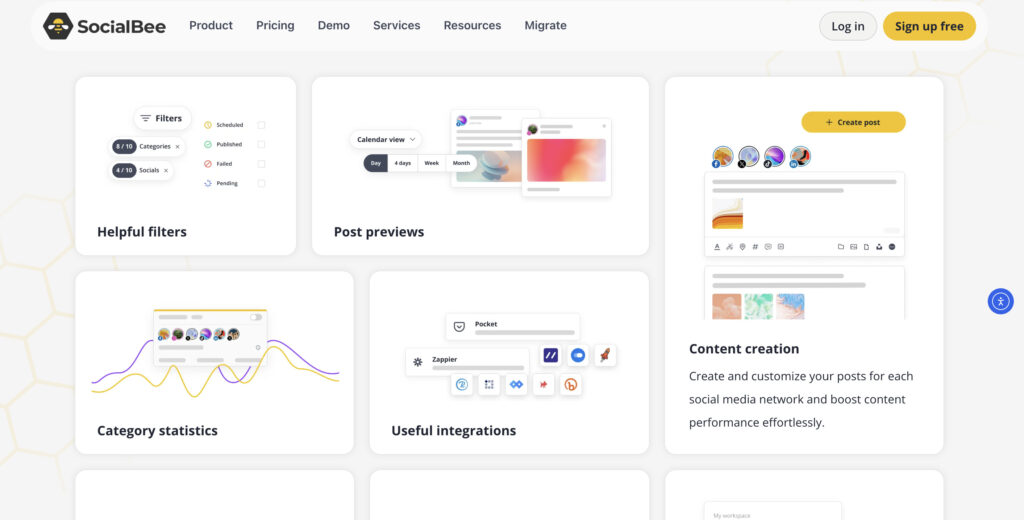
Scheduling: SocialBee’s scheduling experience is among the most advanced. With category-based queues, evergreen re-queuing, and multiple calendar views, it offers unparalleled visibility into your content plan.
Bulk uploading is seamless via CSV, and time-sensitive content can be auto-expired after a set number of shares or days. It posts directly to Facebook, Instagram, Threads, LinkedIn, X, Pinterest, TikTok, YouTube, Google Business Profile, and Bluesky, and it also lists a Universal Posting option.
AI Features: The built-in AI Copilot creates entire posting strategies. Moreover, it can personalize captions, pick hashtags, and help build evergreen sequences.
Team Collaboration & Workflow: SocialBee is team-friendly. Draft posts, get approval, and organize media in shared libraries. Its interface supports smart campaign labeling and one-click content pausing across all platforms.
Pros of SocialBee
- AI Copilot generates full strategies
- Evergreen category queues
- Supports 10 major networks, including Threads, Bluesky, and Google Business Profile, plus a Universal Posting option
- Grid view for Instagram-style aesthetic planning
- Bulk import via CSV; Canva & Unsplash integrations
Cons of SocialBee
- Learning curve for first-time users
- Analytics, while exportable, aren’t as customizable as BI tools
- Entry-level plans limit the number of connected social profiles
4. Sprout Social
Sprout Social is one of the most complete AI-driven social media scheduling tools available, especially for mid-sized teams and agencies. With powerful publishing features, deep analytics, and some of the most intuitive collaboration workflows, it’s no surprise that Sprout is the go-to for teams.
Scheduling: Sprout’s scheduling capabilities are some of the most advanced. The social media calendar gives you a centralized, multi-platform view to plan, queue, and preview your posts. Its optimal send times feature uses 16 weeks of historical audience engagement data to suggest the best time slots for reach and impressions automatically.
AI Features: Sprout’s AI, including AI Assist and its newer Trellis AI agent, is integrated throughout the platform to streamline content creation and accessibility. From automatic caption suggestions to alt-text generation, Sprout helps you overcome writer’s block while improving quality and inclusivity. The content suggestions tool also leverages AI to surface timely, relevant ideas aligned with your brand voice.
Team Collaboration & Workflow: You can assign message approval workflows, share your content calendar with external stakeholders, and manage projects in real-time. The Asset Library, with integrations to tools like Canva and Adobe Experience Manager, keeps your creative pipeline tight and centralized.

Pros of Sprout Social
- Best-in-class social media calendar and publishing tools
- AI-powered send time optimization and content creation
- Exceptional analytics and ROI-focused reporting
Cons of Sprout Social
- Expensive
- Advanced features like social listening and competitor analysis are gated behind higher-tier plans
Read more: Sponsorship Marketing Examples
5. Later
Later is a sleek, creator-friendly social media scheduler that thrives on visual clarity. It lets users schedule posts and drive traffic with ease, all from a drag-and-drop calendar. It’s especially beloved by small teams, agencies, and ecommerce brands.
Scheduling: Later’s scheduling experience is intuitive. You can create, edit, and schedule posts in batches, whether it’s Reels, TikTok, or single images. The visual calendar makes it easy to reorganize your campaigns. Users can also preview content by platform before publishing.
AI Features: Its AI tools aren’t as extensive as some competitors’, but you can auto-generate captions, get hashtag suggestions (limited to higher plans), and find user-generated content (UGC) via smart media tagging and hashtag search.
Team Collaboration & Workflow: Later supports team workflows with features like media libraries and post previews. You can swap media in scheduled posts without deleting them. In addition, content approvals and campaign overviews help teams of any size stay on track.

Pros of Later
- Drag-and-drop calendar UI is beginner-friendly
- Excellent for Instagram and TikTok scheduling
- Great media management with searchable UGC
- Visual post previews
- Batch scheduling
Cons of Later
- Analytics and AI tools are less advanced than competitors like Hootsuite
- Hashtag suggestions are locked behind premium plans
Expert opinion
Dig into every industry, and you’ll find AI changing the nature of work.

Daniela Rus
6. PosterMyWall
PosterMyWall offers an AI-powered, all-in-one marketing solution crafted for small businesses. From social media posting and email campaigns to event landing pages and calendar tools, it supports your growth in every channel. With a library of over 3 million customizable templates, it’s easy to find a polished design and showcase it wherever your customers are.
Scheduling: PosterMyWall’s Content Planner provides a unified calendar view where you can plan, schedule, and manage both social media posts and email campaigns in one place.
To schedule a social post, you simply pick a design, write a caption or generate with AI, and set the post to go live at your chosen time. Scheduling is a Premium feature; free users can publish immediately, but cannot queue posts ahead. PosterMyWall supports publishing to major social platforms such as Facebook, Instagram, TikTok, LinkedIn, X, YouTube Shorts, and more.
Its Instagram scheduler supports Reels, Stories, standard posts, and multi-image/video carousels.
AI Features: PosterMyWall offers a full suite of AI tools to speed up your content creation and marketing. You can generate visuals from text prompts with the AI Image Generator and clean them up instantly using the one-click AI Background Remover.
The AI Writer helps you come up with captions, email copy, or slogans in your brand’s tone. The AI Redesign tool can refresh or reformat any design to suit new styles. For videos, PosterMyWall supports AI Voice (type or generate a script, then sync it with visuals) and AI Subtitles (auto-captioning).
Team & Workflow: Team members can collaborate on creating designs, videos, and campaigns in real time. Once content is ready to go live, the Content Planner helps everyone stay aligned on scheduling and campaign timing.
PosterMyWall also supports event promotion: you can convert a flyer into an event landing page, embed it on your site, promote via social and email, and monitor metrics like registrations and page views.
Pros of PosterMyWall
- Combines design tools, social publishing, event pages, and email campaign planning in one platform
- Generative image AI, voiceover, and subtitle tools reduce friction for video content.
- Unified calendar (Content Planner) to schedule, view, and manage social + email content
Cons of PosterMyWall
- Scheduling and advanced AI tools require a Premium or Premium Plus subscription.
- Analytics are simpler than in specialized social platforms.

Conclusion
So, all that leaves us with is a clear picture of how each AI scheduling tool performs across usability, automation, and collaboration. Whether you’re a solo creator, growing startup, or multi-client agency, there’s now a smarter, AI-powered solution to match your social scheduling needs.
Frequently Asked Questions
Related reading