
Black Friday AI Email Assistants Deals 2026
Black Friday 2026 falls on 27 November and Cyber Monday on 30 November. This list covers 12 AI email assistants that ran a Black Friday or Cyber Monday offer in 2025. For each one you get what the product does, last year’s offer, the regular price the vendor shows today and what to check before you buy.
This list tracks Black Friday offers on AI email assistants, email clients and inbox clean-up tools. Most 2026 deals are not announced yet, so each row shows what the tool offered in 2025 and where we saw it. Check the vendor page for current terms before you buy.
- 12 products are listed, each with the source where the 2025 offer was seen.
- Largest 2025 discounts on this list: Mailbird (80%), Leave Me Alone (70%), MailMaven (50%), YAMM (Yet Another Mail Merge) (50%).
- No vendor on this list has published a 2026 offer yet. Most are announced in November.
- Last checked: 5 October 2026. There are no affiliate links in this list.
All AI email assistants deals in one table
Select a name to jump to the details.
| Product | Type | 2025 Black Friday deal | 2026 status | Regular price today |
|---|---|---|---|---|
| SaneBox | Email management | $25 credit on any new plan (18 Nov – 2 Dec 2025) | not announced yet | see vendor site |
| Mailbird | Email client | 80%+ off Pay Once plan and 30% off yearly plan (24 Nov – 5 Dec 2025) | not announced yet | Premium Yearly list price $5.75 per user per month (shown at $4.03, billed annually, USD); Premium Pay Once list $399 (shown at $99.75); free plan for 1 account |
| Leave Me Alone | Email unsubscribe tool | 70% off the Inbox Hero plan plus buy one get one free | not announced yet | Seven Day Pass $19 one-off (USD, 2 email accounts); subscription plan prices did not load; first 10 unsubscribes are free |
| MailMaven | Mac email client | 50% off (27 Nov – 2 Dec 2025) | not announced yet | $75 USD one-time purchase, includes a 12-month Maintenance Plan; plan renewal $75 USD per year (optional); 15-day free trial |
| YAMM (Yet Another Mail Merge) | Mail merge | 50% off the first year on all plans (24 Nov – 30 Dec 2025) | not announced yet | see vendor site |
| Neo | Business email | 50% off on annual plans (25 Nov – 2 Dec 2025) | not announced yet | from $2.49 per mailbox per month (Business Starter, USD, shown during a sale); Business Standard $4.99, Business Max $9.99; 15-day free trial |
| Newoldstamp | Email signatures | 50% off on any annual plan (24 Nov – 5 Dec 2025) | not announced yet | $109 billed annually, about $1.80 per signature per month (USD, price scales with the number of signatures); 7-day free trial |
| QuillBot | AI writing assistant | 45% off annual plan (until 5 Dec 2025) | not announced yet | Premium: $8.33 per month with annual billing (USD); free plan available |
| InboxPurge | Inbox cleanup | 30% off the PRO plan | not announced yet | Free plan with 20 credits; Basic $5 one-time for 7 days of access; Pro $7 per month or $48 per year (USD) |
| MySignature | Email signatures | 30% off the first payment on all yearly plans (24 Nov – 5 Dec 2025) | not announced yet | see vendor site |
| SpamSieve | Spam filter | 25% off | not announced yet | $39.99 USD one-time license; $63.98 USD for a family or 2 users; 30-day free trial |
| Ninbox | Newsletter reader | 20% off | not announced yet | $2.50 per month or $30 per year (Pro, USD); no free plan; 14-day free trial |
Email management
SaneBox
SaneBox is an email management service that uses AI to filter incoming email by importance, moving less important messages out of the inbox. The vendor says it saves users 3-4 hours a week, and it adds tools for banishing senders, digests, reminders and snoozing.

sanebox.com, captured October 2026.
- BlackHole removes unwanted senders permanently
- Daily Digest summarises unimportant unopened emails
- Reminders for emails that got no reply
- Snooze emails until a set time
- Best for
- Busy professionals with crowded inboxes who want less important mail sorted out automatically.
- Regular price
- No list price was readable on the vendor’s site on 5 October 2026. Check the pricing page before you compare the discount.
- Before you buy
- Prices did not load on the pricing page; check how many email accounts and features each plan includes and the free trial length.
Visit SaneBox2025 offer seen at: kuruntha.com
Email client
Mailbird
Mailbird is a desktop email client for Windows and Mac that brings several accounts, such as Gmail, Outlook, Yahoo, iCloud and Exchange, into one unified inbox. It adds email open tracking, snoozing, an AI writing assistant and more than 30 app integrations.

getmailbird.com, captured October 2026.
- Unified inbox for multiple email accounts
- Real-time email open tracking
- 30+ app integrations including Slack and Google Calendar
- Cross-platform licence for Windows and Mac
- Best for
- Windows and Mac users who manage several email accounts and want them in one desktop app.
- Regular price
- Premium Yearly list price $5.75 per user per month (shown at $4.03, billed annually, USD); Premium Pay Once list $399 (shown at $99.75); free plan for 1 account (vendor pricing page, checked 5 October 2026)
- Before you buy
- Pay Once does not include future versions unless you add Lifetime Updates ($69); there is a 14-day money-back policy.
Visit Mailbird2025 offer seen at: github.com
Email unsubscribe tool
Leave Me Alone
Leave Me Alone finds the newsletters and other subscription emails in your inboxes and lets you unsubscribe from them in bulk from one screen. It also offers Rollups that combine newsletters into a daily or weekly digest, a sender screener and a spam blocker.

leavemealone.com, captured October 2026.
- Bulk unsubscribe across multiple email accounts
- Rollups combine newsletters into daily or weekly digests
- Screener and Spam Blocker for unwanted senders
- Do-not-disturb mode delays email delivery
- Best for
- People with inboxes full of newsletters who want to unsubscribe in bulk.
- Regular price
- Seven Day Pass $19 one-off (USD, 2 email accounts); subscription plan prices did not load; first 10 unsubscribes are free (vendor pricing page, checked 5 October 2026)
- Before you buy
- Check how many email accounts each plan covers and whether you need a one-off pass or a yearly subscription; 14-day money-back policy.
Visit Leave Me Alone2025 offer seen at: github.com
Mac email client
MailMaven
MailMaven is an email client for the Mac from SmallCubed, described as combining the familiarity of Apple Mail with the features of MailSuite. It works with Gmail, iCloud, Exchange, Office 365, Yahoo, IMAP and POP3 accounts and adds tagging, notes and review dates to messages.

smallcubed.com, captured October 2026.
- Message tagging with keywords, projects, review dates and notes
- Conversation view across all mailboxes
- Table view and Gmail label management
- Scheduled sending of messages
- Best for
- Mac users with heavy email workloads who want more control than Apple Mail offers.
- Regular price
- $75 USD one-time purchase, includes a 12-month Maintenance Plan; plan renewal $75 USD per year (optional); 15-day free trial (vendor pricing page, checked 5 October 2026)
- Before you buy
- The app keeps working without renewal, but updates, sync and support need the $75 yearly Maintenance Plan; refunds keep a 15% administration fee.
Visit MailMaven2025 offer seen at: github.com
Mail merge
YAMM (Yet Another Mail Merge)
Yet Another Mail Merge (YAMM) lets you send personalized mass emails from Gmail using a Google Sheet as the contact list. It tracks opens, clicks, replies and bounces in real time, and it can schedule merges and send follow-up campaigns.

yamm.com, captured October 2026.
- Personalized subject lines and content from spreadsheet data
- Real-time tracking of opens, clicks, responses and bounces
- Scheduled mail merges and follow-up campaigns
- Free plan with 20 recipients per day
- Best for
- Gmail and Google Workspace users who send personalized bulk emails from a Google Sheet.
- Regular price
- No list price was readable on the vendor’s site on 5 October 2026. Check the pricing page before you compare the discount.
- Before you buy
- Prices vary by billing country; check the daily recipient quota (400 on Pro Gmail, 1,500 on Pro Workspace) and that refunds are rarely given.
Visit YAMM (Yet Another Mail Merge)2025 offer seen at: github.com
Business email
Neo
Neo is a suite for small businesses that combines business email on a custom domain, an AI website builder and domain registration. It lets a business set up a professional email address and a mobile-responsive website without technical skills, with read receipts and email templates built in.

neo.space, captured October 2026.
- Business email at your own domain with read receipts
- AI website builder that generates a mobile-responsive site
- Free .co.site domain for the first billing cycle
- Email templates and send-later scheduling
- Best for
- Freelancers, startups and small businesses that need a branded email address and a simple website.
- Regular price
- from $2.49 per mailbox per month (Business Starter, USD, shown during a sale); Business Standard $4.99, Business Max $9.99; 15-day free trial (vendor pricing page, checked 5 October 2026)
- Before you buy
- Prices are per mailbox and depend on the term (monthly, yearly, two or four years); check the renewal price after the promotional period.
Visit Neo2025 offer seen at: blog.coupler.io
Email signatures
Newoldstamp
Newoldstamp is a platform for creating and managing email signatures for a whole company from one dashboard. Signatures can be deployed automatically through Google Workspace, Microsoft 365 and Exchange, and banner campaigns in the signature can be tracked with click analytics.

newoldstamp.com, captured October 2026.
- Central dashboard for all company email signatures
- Integrations with Google Workspace, Microsoft 365 and Exchange
- Signature templates with a live preview editor
- Banner campaigns with click tracking and analytics
- Best for
- Marketing and IT teams that need consistent, centrally managed signatures across many employees.
- Regular price
- $109 billed annually, about $1.80 per signature per month (USD, price scales with the number of signatures); 7-day free trial (vendor pricing page, checked 5 October 2026)
- Before you buy
- Pricing is per signature, and signatures stop working when the subscription expires, so check the signature count and the renewal cost.
Visit Newoldstamp2025 offer seen at: cheqmark.io
AI writing assistant
QuillBot
QuillBot is an AI writing suite best known for its paraphrasing tool. It also offers a grammar checker, AI detector, plagiarism checker, humanizer, summarizer, translator and citation generator, along with newer tools for AI chat, images and PDFs.

quillbot.com, captured October 2026.
- Paraphrasing with multiple modes
- Grammar and spelling checker
- Plagiarism checker with 25,000 words per month on Premium
- AI detector and humanizer
- Best for
- Students, academics and professionals who rewrite, check and cite text regularly.
- Regular price
- Premium: $8.33 per month with annual billing (USD); free plan available (vendor pricing page, checked 5 October 2026)
- Before you buy
- Check that the low monthly figure requires annual billing, and look up the refund terms, which the pricing page does not state.
Visit QuillBot2025 offer seen at: feisworld.com
Inbox cleanup
InboxPurge
InboxPurge is a Chrome extension that works inside Gmail and helps you unsubscribe from newsletters, delete emails in bulk and block unwanted senders. The vendor says emails remain on your device and are never sent to external servers during the cleanup.

inboxpurge.com, captured October 2026.
- Mass unsubscribe from newsletters and promotions
- Bulk delete of emails by sender
- Runs inside Gmail as a Chrome extension
- Emails stay on your device, per the vendor
- Best for
- Gmail users with a cluttered inbox who want to remove subscriptions and old emails in bulk.
- Regular price
- Free plan with 20 credits; Basic $5 one-time for 7 days of access; Pro $7 per month or $48 per year (USD) (vendor pricing page, checked 5 October 2026)
- Before you buy
- Check whether the offer is the 7-day Basic pass or the Pro subscription, and note the 14-day refund window.
Visit InboxPurge2025 offer seen at: github.com
Email signatures
MySignature
MySignature is an HTML email signature generator that lets you build a signature without coding and install it in common email clients. It offers more than 100 templates, analytics for opens and clicks, and central management for teams on Google Workspace and Microsoft 365.

mysignature.io, captured October 2026.
- 100+ email signature templates
- AI design suggestions for layout and colors
- Signature analytics for opens and clicks
- Team management for Google Workspace and Microsoft 365
- Best for
- Freelancers, solo professionals and small teams that want a branded email signature with tracking.
- Regular price
- No list price was readable on the vendor’s site on 5 October 2026. Check the pricing page before you compare the discount.
- Before you buy
- A free plan with limited features exists; check which paid tier removes MySignature branding and whether billing is monthly or yearly.
Visit MySignature2025 offer seen at: cheqmark.io
Spam filter
SpamSieve
SpamSieve is a Bayesian spam filter for Mac email clients such as Apple Mail, Outlook, Airmail, MailMate and GyazMail. It learns from the messages you receive, keeps an allowlist of known correspondents and a blocklist, and works with IMAP, Exchange and POP accounts.

c-command.com, captured October 2026.
- Bayesian filtering that learns from your own mail
- Automatic allowlist and blocklist
- Works with Apple Mail, Outlook, Airmail and MailMate
- Color-coded spam levels and accuracy statistics
- Best for
- Mac users who get a lot of spam and want filtering inside their existing email client.
- Regular price
- $39.99 USD one-time license; $63.98 USD for a family or 2 users; 30-day free trial (vendor pricing page, checked 5 October 2026)
- Before you buy
- It is a one-time license, but major version upgrades are paid unless bought in the last six months; discounts apply only to direct purchases.
Visit SpamSieve2025 offer seen at: github.com
Newsletter reader
Ninbox
Ninbox gives you a separate @ninbox.com email address to use only for newsletter subscriptions, so newsletters stay out of your personal inbox. It stores and displays them in an ad-free reading view, with groups, full-text search and RSS feeds.

ninbox.io, captured October 2026.
- Dedicated @ninbox.com address for newsletter signups
- Smart Groups by topic, author or schedule
- RSS feed generation from newsletters
- Full-text search across newsletters
- Best for
- People who subscribe to many newsletters and want to read them outside their main inbox.
- Regular price
- $2.50 per month or $30 per year (Pro, USD); no free plan; 14-day free trial (vendor pricing page, checked 5 October 2026)
- Before you buy
- There is no free plan after the 14-day trial, and yearly billing costs the same per month as monthly billing.
Visit Ninbox2025 offer seen at: github.com
How to use these Black Friday deals
- Compare the sale price with the regular price in each card, not with a crossed-out list price. Some vendors show a first-year discount all year.
- Check what you pay at renewal. Many offers apply to the first billing period only.
- Match the plan limits (seats, sites, credits, contacts) to what you use today, then decide if a longer term is worth it.
- Lifetime plans depend on the vendor staying in business. Read the refund terms before you pay.
- Buying software for a site? See also our Black Friday WordPress deals and Black Friday hosting deals.
Questions about Black Friday AI email assistants deals
When do Black Friday AI email assistants deals start in 2026?
Black Friday is on 27 November 2026 and Cyber Monday on 30 November 2026. In 2025 many software vendors opened their offers one to two weeks earlier and kept them open into the first days of December.
Are these 2026 deals?
Not yet. Each card shows the 2025 offer and marks the 2026 status. We replace last year’s offer as soon as the vendor confirms a new one.
How are the deals checked?
Every offer links to the page where it was seen: the vendor’s own page or a dated roundup. Regular prices come from each vendor’s pricing page, read on 5 October 2026. Where a price was not readable, the card says so.
How can a vendor get listed?
Listing is free. Send the tool name, the offer, the dates and a link through the contact page.
More Black Friday deal lists
- All Black Friday deals lists
- Black Friday Task Management Software deals
- Black Friday Invoicing Software deals
- Black Friday Proposal Software deals
- Black Friday Notion Alternatives deals
- Black Friday Project Management Tools deals
- Black Friday AI Calendar and Time Management Tools deals
- Black Friday WordPress deals
- Black Friday Hosting deals
Deals change and can end early. Check the final price on the vendor’s site before you buy.
Want your deal on this list?
Listing is free. Send us the tool name, the offer, the dates and a link. We check it and add it.
Contact usWhen you compare today’s top AI email assistant tools, you will see that many of them have powerful features like smart email drafting and inbox prioritization. These amazing tools aim to save you hours each week by offering you a smooth and efficient email management experience.
Given the improvements in AI technology and integrations with platforms like Outlook and Gmail, there’s never been a better time to upgrade your team’s email workflow.
Keep reading, and you’ll learn about the nine best AI email assistants for your team.
What are the Benefits of AI Email Assistants?
Over the next three years, 92% of companies plan to increase their investments in AI. AI email assistants are helping transform how they communicate and manage their inboxes. The most advanced assistants come with features that improve efficiency, collaboration, and customer engagement across the board.
For saving time and boosting productivity:
In a research from Microsoft and LinkedIn, users report that AI helps them save time (90%) and focus on their most important tasks (85%). AI email assistants automate repetitive, low-value tasks such as sorting incoming messages and scheduling follow-ups. Moreover, AI can draft emails and suggest replies based on context.
Teams engaged in complex projects also benefit from AI’s ability to summarize lengthy email threads and highlight main points and decisions, saving everyone from reading through every message. According to Gartner, AI will automate 80% of the tasks currently performed in project management by 2030.
For improving collaboration and communication:
Beyond individual efficiency, AI email assistants transform email into a collaborative platform. Shared inboxes allow multiple team members to access and work on the same email threads, adding comments and assigning tasks directly from messages.
Furthermore, as AI can learn from past emails, it can develop consistency with tone and brand voice in all emails. AI also helps capture and track action items automatically.
For better organization and focus:
The AI assistants analyze incoming messages and prioritize urgent emails. Furthermore, these tools enable personalized workflows, such as automatically tagging urgent customer support emails and assigning them to available agents.
For enhancing customer service and sales:
For customer-facing teams, AI email assistants provide faster responses by drafting quick, accurate replies to common inquiries. Sales teams also gain an edge through AI-driven research and personalization of outreach emails.
A recent HubSpot survey revealed that automating direct brand messaging and conversational marketing (including conversational emails) are among the most common tasks where generative AI is used.
Jump into AI email assistants designed for teams, and you’ll find powerful tools that not only save time but also enhance collaboration and streamline workflows. Overall, AI email assistants make teams more efficient and organized.
9 Best AI Email Assistants for Teams in 2026
Right now, you and your team can enhance your email processes with these great AI email assistants. These AI-powered tools streamline tedious tasks and are game-changers for modern team communication:
- Microsoft Copilot in Outlook
- Gemini in Gmail
- Superhuman
- SaneBox
- Missive
- Shortwave
- Compose AI
- Notion Mail (discontinued in September 2026)
- MailMaestro (Flowrite)
- SmartWriter
| AI Email Assistant | Best For | Email Platform Compatibility | AI Capabilities & Workflow Automation | Starting Price |
| Microsoft Copilot in Outlook | Microsoft 365 users | Outlook (Microsoft 365) | AI drafting, summarization, and prioritization | Add-on to a qualifying Microsoft 365 plan (Copilot Business list price $21/user/month, billed annually) |
| Gemini in Gmail | Google Workspace users | Gmail (Google Workspace) | Smart replies, summarization, task suggestions | Included in Google Workspace plans (Business Starter from $7/user/month, billed annually) |
| Superhuman | Speed | Gmail, Outlook | AI-generated responses | Superhuman Mail is part of the Superhuman Business plan: $33/month billed annually ($40 monthly) |
| SaneBox | Inbox organization | Gmail, Outlook | Inbox filtering, prioritization | From $9.49/month for the Snack plan (less with annual billing) |
| Missive | Team collaboration and shared inboxes | Gmail, Outlook, SMS, WhatsApp | Smart replies, summarization, and task suggestions | $14/user/month |
| Shortwave | Team collaboration & smart inbox management | Gmail | Smart inbox, collaboration features | $30/seat/month for the Business plan (14-day free trial) |
| Compose AI | Free AI email writing | Gmail | AI-generated drafts, customizable tone | Free plan available; paid Premium tier |
| Notion Mail | AI-powered inbox filtering and prioritization | Gmail | Inbox filtering, AI prioritization | Discontinued on September 22, 2026 |
| MailMaestro (Flowrite) | AI writing assistance | Gmail, Outlook | AI writing assistant, email drafts | $12/seat/month (Free plan available) |
1. Microsoft Copilot in Outlook – Best for enhancing communication within the Microsoft 365 ecosystem
Microsoft Copilot is here, and this is the ideal time to discover why it is becoming a fundamental part of many teams. With Copilot’s AI-powered assistance, I’m seriously telling you will rethink it’s time to jump into one of the most intelligent productivity tools out there.
Core Functionality and Specialization
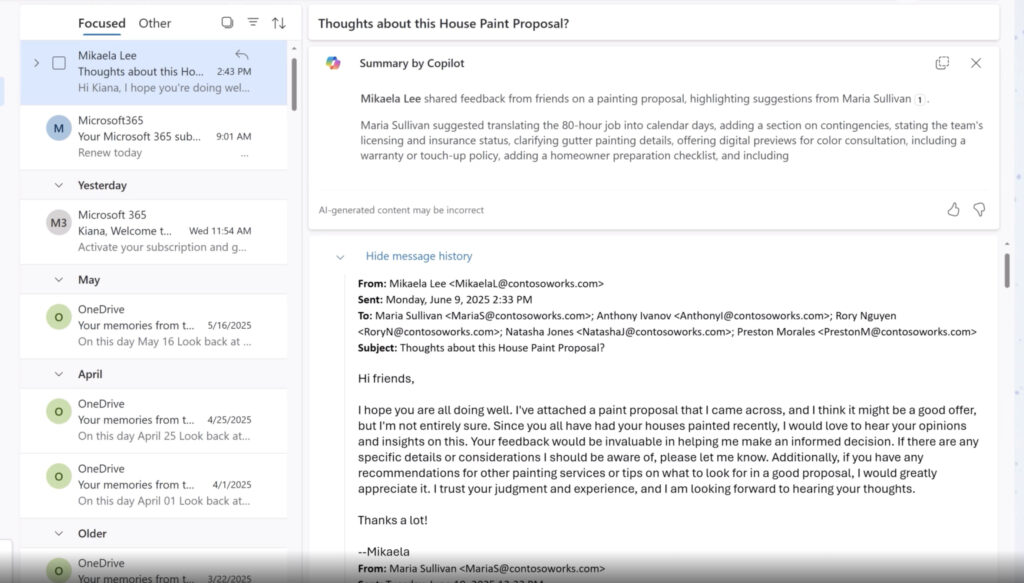
See, Microsoft Copilot in Outlook understands and responds to natural language prompts, enabling users to draft and organize emails. For instance, you can ask Copilot to “Draft a follow-up email after the meeting,” or “Summarize this email thread”.
Beyond simple drafting, Copilot can analyze and summarize complex conversations, locate specific emails or attachments, and refine the tone of messages to match your intended audience.
Moreover, Copilot’s scheduling capabilities are finely tuned to handle meeting setups with natural language commands, automatically finding the best available times. Copilot’s ability to identify and remind users of action items from unread emails further underscores its role as a smart assistant tailored for business environments.
Integration and Ecosystem Compatibility
Microsoft Copilot seamlessly integrates within the Microsoft 365 ecosystem. Unlike many other AI tools, Copilot taps directly into Outlook, Teams, OneDrive, and other Microsoft apps. For example, you can request Copilot to “Show Teams messages where I was @mentioned today”.
This deep ecosystem compatibility means Copilot respects organizational policies, such as sensitivity labels that restrict data access. Microsoft’s strict privacy measures include data encryption in transit and at rest.
2. Gemini in Gmail – Best for Google Workspace users
You can get by with basic email tools, but Gemini in Gmail brings a smarter, more personalized experience. Its ability to pull relevant details and help manage your inbox effortlessly makes it one of the best AI email assistants available.
Core Functionality and Specialization
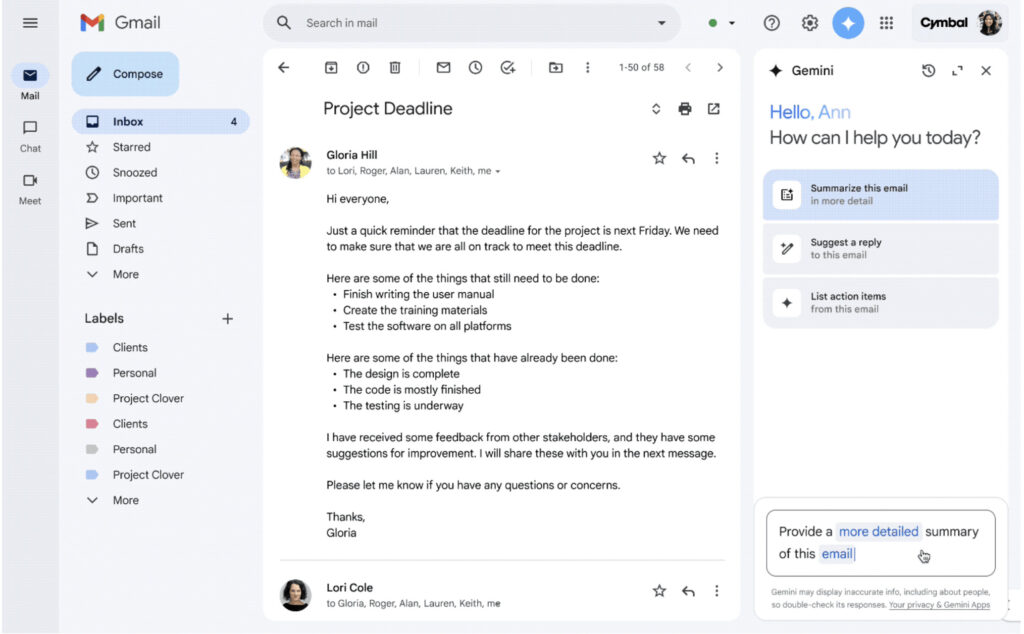
To be fair, Gemini in Gmail is definitely designed to save you time. The tool pulls relevant details from your past emails and Google Drive, so you don’t need to dig through endless threads or files to find context.
Gemini’s personalized smart replies adapt to your tone, whether that’s crisp and formal or conversational. And when things get overwhelming in your inbox, Gemini helps you reclaim control by letting you delete or archive emails with simple commands.
You will be impressed by its deep contextual awareness. It can summarize long email threads into clear key points. Gemini also lets you quickly find specific information, such as “What should I prepare for next week’s meeting?” right from your inbox.
Its Contextual Smart Reply feature offers tailored response suggestions, each with a sentiment header, helping you pick the right tone and message instantly. Gemini crafts responses that fit the situation. Besides, with the “Help me write” tool, you can customize or polish any draft quickly.
Gemini also detects when you’re trying to set up an appointment and nudges you to share your booking page right from Gmail.
Integration and Ecosystem Compatibility
Gemini is tightly woven into Google Workspace. This allows the AI assistant to pull data not just from Gmail but also from Google Drive and Google Calendar. As a result, Gemini can find files related to your emails or create calendar events based on your conversations without switching apps.
Read more Best Tools for AI Meeting Summaries in 2026
3. Superhuman – Best for speed
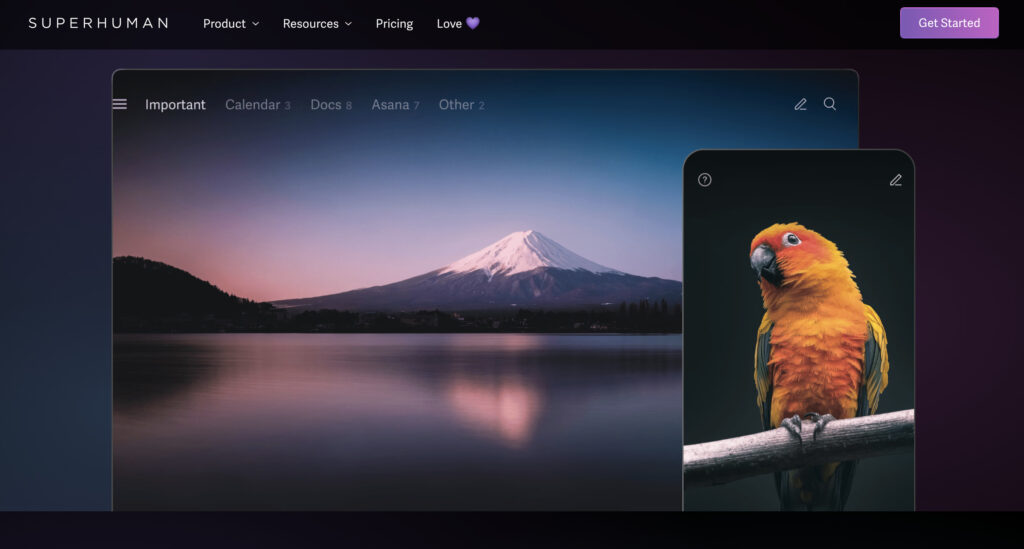
It’s frustrating that many email clients fail to keep up with high-volume inboxes, but Superhuman turns that around with lightning-fast AI-powered features. The combination of smart auto-labeling, instant replies, and deep inbox customization makes it the fastest and most efficient email assistant for high-performing teams. Superhuman was acquired by Grammarly in 2025; the company has since rebranded as Superhuman, and the email app is now called Superhuman Mail.
Core Functionality and Specialization
Superhuman speeds up every part of email management. For example:
- Auto Labels intelligently separate marketing, cold pitches, and social updates.
- Auto Archive clears clutter automatically.
- AI drafts emails for you, matching your unique voice and tone based on previous messages.
- And more.
Superhuman also ensures timely follow-ups by automatically reminding you and even drafting those emails in advance. Its AI-powered search lets you ask natural questions and get instant, accurate answers.
Integration and Ecosystem Compatibility
Superhuman integrates with both Gmail and Outlook. Unlike default inboxes, Superhuman offers customizable split inboxes and team collaboration tools such as live email comments and @mentions to unblock workflows faster.
4. SaneBox – Best for inbox organization
The way SaneBox automatically cleans and organizes your inbox means you spend a few hours less per week managing emails. A simple setup with powerful AI filters helps you save time and keep your sanity.
Core Functionality and Specialization
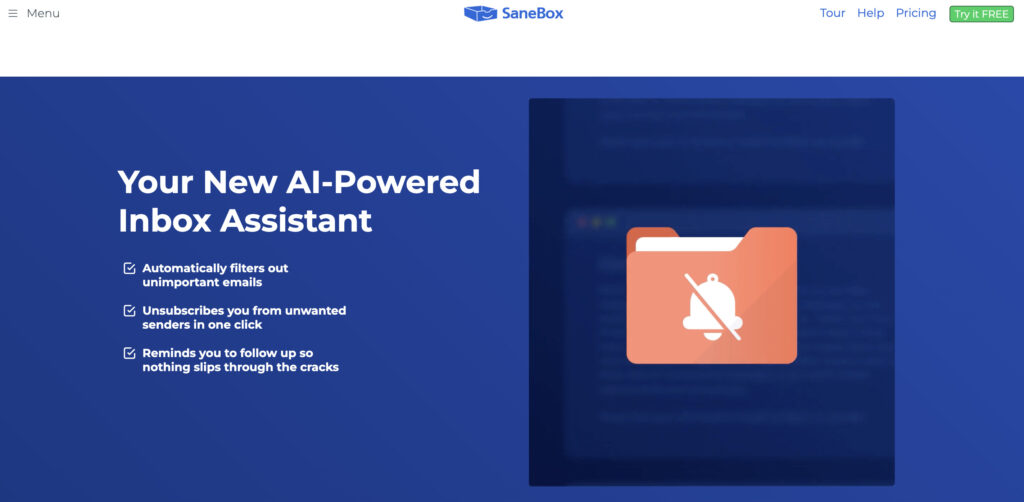
SaneBox automatically filters unimportant emails. It also permanently blocks unwanted senders, summarizes unopened emails, and allows bulk actions that keep inboxes manageable. With features like email deep clean, users can purge tens of thousands of old emails in minutes.
Integration and Ecosystem Compatibility
SaneBox works across every email client and device without downloads or manual setups. Whether on iOS, Android, desktop, or webmail, it filters emails directly on the server.
5. Missive – Best for team collaboration and shared inboxes
In many ways, Missive stands out as both a powerful email assistant and a powerful collaboration tool for teams. In fact, it may not have every niche feature of some specialized platforms, but it offers integration of email, chat, and task management in one seamless interface. Not only that, Missive’s AI capabilities and automation options help teams work smarter.
Core Functionality and Specialization
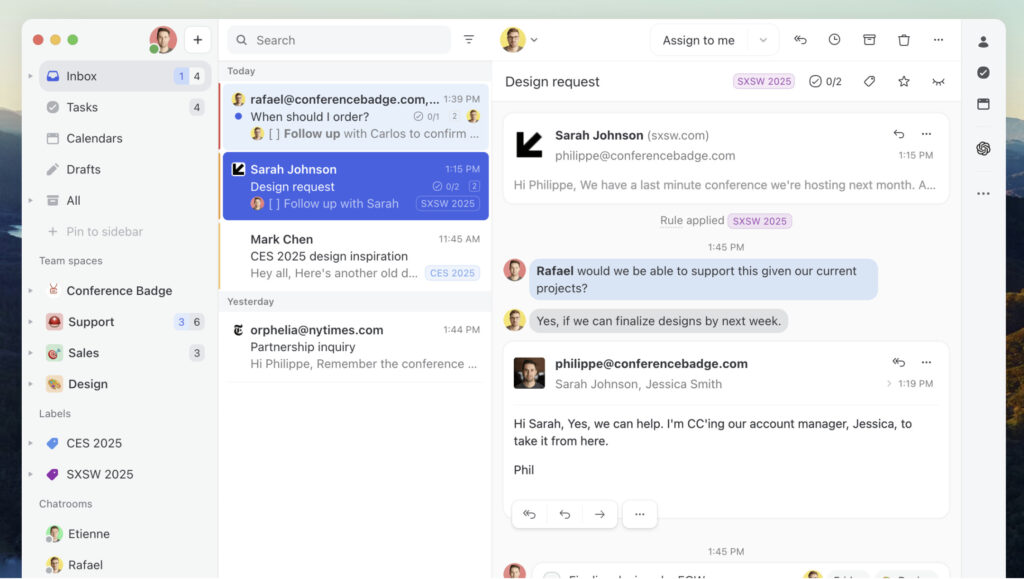
Missive transforms traditional email into a powerful collaborative workspace. It offers shared team inboxes where multiple users can manage messages, assign conversations to specific team members, and keep full visibility through conversation links and audit trails. The platform supports real-time collaborative drafting and internal threaded discussions.
Task management is deeply embedded within the email workflow, enabling users to create, assign, and track tasks directly from conversations. Automated smart task attributes such as assignee, due dates, and linked conversations minimize manual input and ensure contextual clarity.
Canned responses with dynamic variables save time and maintain personalization. The workload balancing feature smartly distributes emails among team members using several strategies.
Integration and Ecosystem Compatibility
Missive integrates seamlessly with a wide range of tools and platforms. It syncs effortlessly with Office 365 and Google Contacts, ensuring that shared and private contact books remain up to date. Through API endpoints and custom webhooks, Missive enables businesses to tailor workflows by connecting to order tracking systems and other critical applications.
A unique feature is the capacity to manage multiple organizations or companies under a single Missive account. Custom channels allow teams to pull messages from any communication source into a centralized inbox.
6. Shortwave – Best for team collaboration and smart inbox management
Even though there are many AI email assistants, Shortwave stands out as an all-in-one tool for managing your inbox. Shortwave transforms the entire email experience with advanced AI automation and intuitive team collaboration.
Core Functionality and Specialization
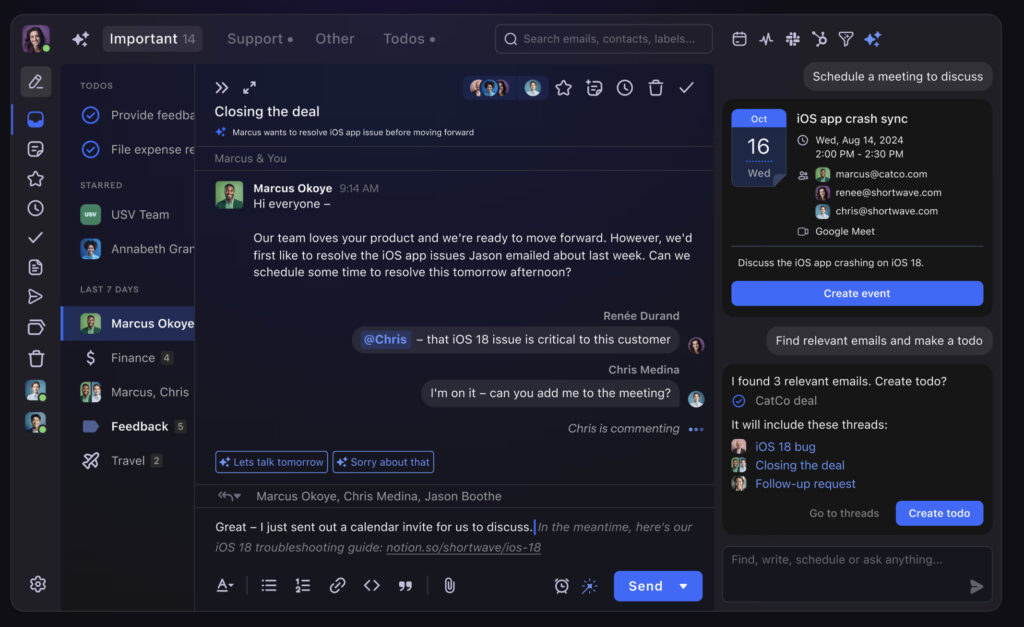
The Shortwave Agent acts as your personal inbox assistant, organizing emails into actionable categories, identifying important tasks, and decluttering your day.
It doesn’t stop there. Shortwave’s AI filters allow you to write custom rules in plain English, automatically labeling, starring, archiving, or delegating emails. The inbox can be split into multiple tabs to help you focus on priority senders, labels, or custom queries.
Powerful features, including transforming emails into to-dos, scheduling email deliveries, and real-time tracking of email opens, empower you to manage communication flow. Additionally, AI-powered search lets you instantly find information buried deep in your inbox or across your team’s emails and attachments.
Integration and Ecosystem Compatibility
Shortwave connects with your favorite workplace tools, such as Slack, Calendar, Notion, Asana, and more. The platform supports multi-account Gmail access, so managing multiple email identities across devices is smooth. Its shared threads, labels, and AI-searchable archives make team collaboration straightforward.
7. Compose AI – Best free AI email writing tool
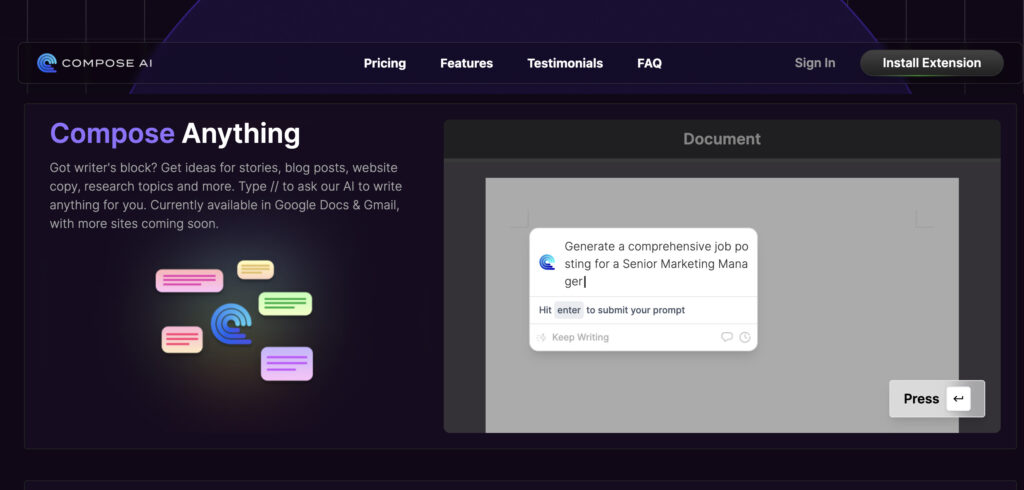
Compose AI is a versatile AI writing assistant that tackles writer’s block, generates content, and polishes emails. The tool brings professional-grade writing assistance.
Core Functionality and Specialization
Compose AI specializes in enhancing and accelerating the writing process. Its standout feature is the ability to autocomplete your sentences in real-time as you type, seamlessly integrating AI suggestions that feel natural and on-brand. By typing simple commands, users can generate any kind of text.
One of Compose AI’s features is its email-specific capabilities. It can create full, professional email replies from a few keywords or brief prompts. Additionally, the AI offers quick rephrasing options.
Integration and Ecosystem Compatibility
With native support for Google Docs and Gmail, Compose AI fits naturally into workflows. The tool is expanding available support to more websites and applications.
That said, it appears that Compose AI’s integrations are limited compared to some of the all-in-one email platforms, but because of its intense focus on writing productivity, it provides the highest quality, contextually relevant writing productivity assistance wherever available.
Read more Best AI Content Writing Tools (Pros & Cons)
8. Notion Mail – Best for inbox filtering and prioritization
Update for 2026: Notion discontinued the standalone Notion Mail app on September 22, 2026, and now points users to Notion’s AI agents for handling email inside the main Notion workspace. The description below is kept for reference and reflects how Notion Mail worked before it was retired. Rather than settling for generic inbox sorting, Notion Mail offers a highly customizable, AI-powered system that organizes, drafts, and schedules your emails with a personal touch.
Core Functionality and Specialization
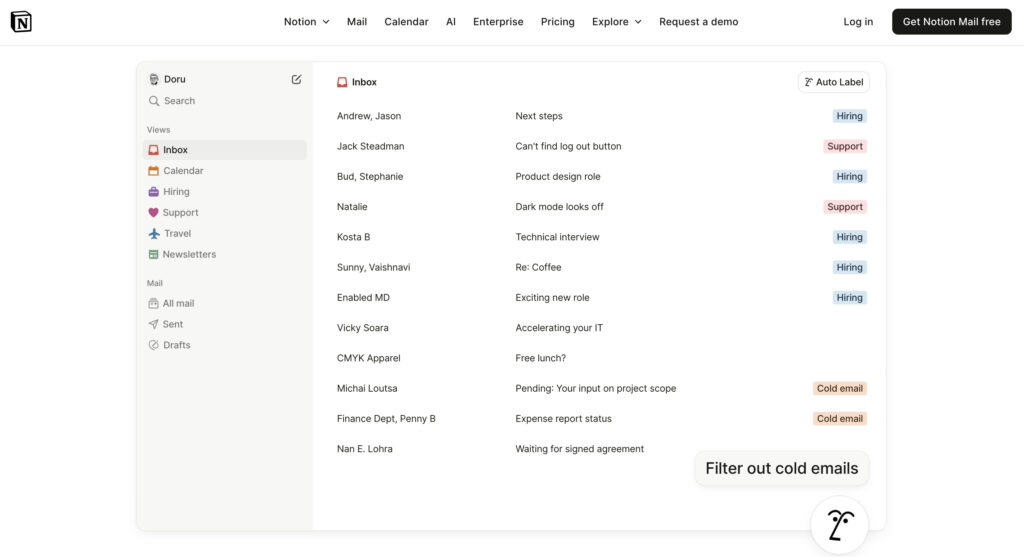
Notion Mail has its ability to “think like you”. It uses AI to automatically label and sort your emails based on what you care about most. You can train Notion AI to identify important messages and push them to the top, while filtering out noise like promotions and social updates.
Beyond organization, Notion Mail supercharges productivity with features like built-in scheduling integrated with Notion Calendar, one-click snippets for reusable email templates, and AI-assisted writing to help draft responses quickly. Its inbox splits into custom views, allowing you to concentrate deeply on different categories such as travel plans, newsletters, or hiring, instead of a generic chronological inbox.
This level of personalization, mirroring the flexibility of Notion’s database filtering but applied to email, makes Notion Mail stand apart as an inbox that adapts dynamically to your unique workflows and communication style.
Integration and Ecosystem Compatibility
Notion Mail integrates primarily with Gmail and Google accounts, leveraging the familiarity and ubiquity of these platforms while enhancing them with advanced AI and customization. The native integration with Notion Calendar brings a seamless experience for scheduling meetings without leaving your inbox.
9. MailMaestro (Flowrite) – Best for AI email writing assistance
When we first explored MailMaestro (formerly Flowrite), we were impressed by its powerful AI-driven email writing and management features.
Core Functionality and Specialization
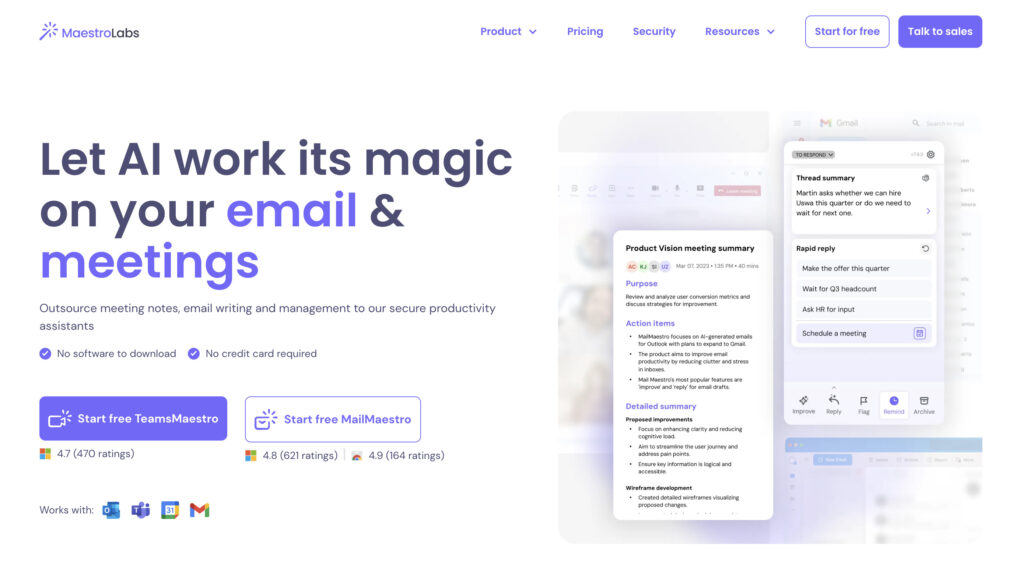
MailMaestro combines AI-powered email drafting with comprehensive email management features. Its AI email writer generates multiple polished drafts from a short prompt, supporting many languages and tones to fit any communication style.
Beyond writing, MailMaestro automatically summarizes entire email threads and attachments. AI-driven responses use thread context for relevant and efficient replies. The system also automatically extracts action items, deadlines, and reminders.
Integration and Ecosystem Compatibility
MailMaestro stands out by integrating natively into Microsoft 365 environments, including Outlook, Teams, and Gmail, appearing directly on the sidebar. Supporting multiple platforms and devices, it adapts to diverse team setups. Its synergy with TeamsMaestro extends AI productivity beyond email to meetings, turning conversations into clear next steps auto-assigned to team members.
Conclusion
In our review of the best AI email assistants, we were impressed by how these tools increase our productivity. Many options are currently available with free trials or affordable plans, so now is a great time to upgrade your team’s email workflow.
Expert opinion
AI will not replace humans, but those who use AI will replace those who don’t.

Ginni Rometty
Former CEO of IBM
Frequently Asked Questions