
Quick answer: The best Notion alternatives are monday.com and ClickUp (project management with docs), Obsidian (private, linked notes), Airtable (databases), Asana and Trello (task management), Anytype and AFFiNE (privacy-focused, local-first), Slite and Coda (team wikis) and Microsoft Loop or OneNote (for Microsoft 365 users). Pick ClickUp if you want one tool for tasks and docs, Obsidian if you want notes stored on your own device, and Slite if your team mainly needs a clean wiki.
Black Friday Notion Alternatives Deals 2026
Black Friday 2026 falls on 27 November and Cyber Monday on 30 November. This list covers 14 Notion alternatives that ran a Black Friday or Cyber Monday offer in 2025. For each one you get what the product does, last year’s offer, the regular price the vendor shows today and what to check before you buy.
This list covers Black Friday offers on note-taking, task and workspace apps that people use instead of Notion. Each row shows the most recent offer we could confirm and where it was published.
- 14 products are listed, each with the source where the 2025 offer was seen.
- Largest 2025 discounts on this list: Taskip (70%), DoubleMemory (60%), Superlist (50%), FiveNotes (50%).
- No vendor on this list has published a 2026 offer yet. Most are announced in November.
- Last checked: 5 October 2026. There are no affiliate links in this list.
All Notion alternatives deals in one table
Select a name to jump to the details.
| Product | Type | 2025 Black Friday deal | 2026 status | Regular price today |
|---|---|---|---|---|
| Craft Docs | Notes and documents | 40% lifetime off, no code required (until Dec 2, 2025) | not announced yet | Plus $8.00 per month billed monthly, or $6.40 per month billed annually (USD); Family $15 and Team $50 per month; free plan exists |
| ProofHub | Project management | Up to 40% off the Ultimate Control Plan for six months (until Dec 2, 2025) | not announced yet | from $50 per month billed monthly or $45 per month billed annually (Essential, USD, unlimited users, 40 projects); no free plan, 14-day free trial |
| Flowlu | Business management | 40% off yearly Essential and Advanced plans (Nov 24 – Dec 2, 2025) | not announced yet | from $12 per user per month billed monthly or $9 per user per month billed yearly (Essential, USD); free plan for up to 2 users |
| Things | Task manager | 30% off, auto applied | not announced yet | see vendor site |
| Superlist | Task management | 50% off your first year on all annual plans | not announced yet | Basic: $5 per person per month or $59 per year (USD); free plan with up to 5 lists |
| Taskip | Client management | 70% off the Yearly and Lifetime plans (Nov 15 – Dec 5, 2025) | not announced yet | from $12 per month for 1 user (USD); free trial without credit card |
| FluentBoards | WordPress project management | Up to 30% off (Nov 17 – Dec 3, 2025) | not announced yet | list price $149 per year (Single License, USD), shown discounted to $119 per year; lifetime Single License listed at $399, shown at $319; a free version exists |
| Elephas | AI assistant for Mac | 20% off on all lifetime plans (Nov 18 – Dec 4, 2025) | not announced yet | from $19 per month (Standard, billed monthly, USD); Professional $39 and Pro+ $49 per month; free plan with 20 credits per month |
| Anybox | Bookmark manager | 30% off on the App Store | not announced yet | Pro $1.99 per month, $14.99 per year or $39.99 lifetime (listed regular lifetime price $59.99), in USD; free tier limited to 50 links |
| SideNotes | Notes app | 40% off Lifetime (Nov 21 – Dec 3, 2025) | not announced yet | $19.99 one-time purchase per major version (USD); free trial available; no subscription |
| FiveNotes | Notes app | 50% off Lifetime (Nov 21 – Dec 3, 2025) | not announced yet | $19.99 one-time purchase per major version (USD); free trial available; no subscription |
| ConniePad | Notes app | 50% off (until Dec 1, 2025) | not announced yet | Lifetime plan $59 one-time (listed regular price $79, USD); free plan with up to 50 notes |
| Luckynote | Notes app | 50% off Lifetime (until Dec 1, 2025) | not announced yet | see vendor site |
| DoubleMemory | Read-it-later app | 60% off on lifetime plan | not announced yet | Plus $17.99 per year, or Kindred Spirit lifetime $59.99 one-time (USD); the page says these become $29.99 per year and $79.99 on Oct 15, 2026; free plan available |
Notes and documents
Craft Docs
Craft is a productivity app for notes, tasks and documents that syncs across devices. It combines docs, tasks, a calendar, whiteboards and daily notes, lets you organise content with spaces, folders and tags, and includes AI writing help plus publishing and sharing of documents.

craft.do, captured October 2026.
- Docs, tasks, calendar and whiteboards in one app
- Daily notes and templates
- Write with AI assistant
- Publish and share documents by link
- Best for
- Individuals, families and small teams who want one tidy app for notes, documents and tasks.
- Regular price
- Plus $8.00 per month billed monthly, or $6.40 per month billed annually (USD); Family $15 and Team $50 per month; free plan exists (vendor pricing page, checked 5 October 2026)
- Before you buy
- The free plan is limited to 1,500 blocks and 1 GB; check AI credit limits and annual versus monthly billing on Plus.
Visit Craft Docs2025 offer seen at: github.com
Project management
ProofHub
ProofHub is a project management and team collaboration tool that brings tasks, chat, discussions, files, notes and time tracking into one place. Tasks can be viewed as boards, Gantt charts, tables or calendars, and files can be reviewed and approved with its proofing tool.

proofhub.com, captured October 2026.
- Board, Gantt, table and calendar task views
- Real-time chat, discussions and announcements
- Proofing and file approval
- Time tracking and project reports
- Best for
- Teams that prefer a flat monthly fee with unlimited users instead of per-seat pricing.
- Regular price
- from $50 per month billed monthly or $45 per month billed annually (Essential, USD, unlimited users, 40 projects); no free plan, 14-day free trial (vendor pricing page, checked 5 October 2026)
- Before you buy
- Ultimate Control shows an introductory rate for 3 months, then $135 per month on annual billing, so check the price after the offer ends.
Visit ProofHub2025 offer seen at: proofhub.com
Business management
Flowlu
Flowlu is all-in-one business software that combines a CRM, project and task management, invoicing and financial management, and team collaboration. It also includes time tracking, a knowledge base, a client portal, an agile issue tracker and workflow automation.

flowlu.com, captured October 2026.
- CRM with contact management and pipelines
- Projects with Gantt charts, sprints and Kanban tasks
- Online invoicing, estimates and expense tracking
- Knowledge base and client portal
- Best for
- Small businesses and agencies that want CRM, projects and invoicing in one system.
- Regular price
- from $12 per user per month billed monthly or $9 per user per month billed yearly (Essential, USD); free plan for up to 2 users (vendor pricing page, checked 5 October 2026)
- Before you buy
- Pricing is per user and the page states no refunds are issued, so test with the 7-day trial or the free plan first.
Visit Flowlu2025 offer seen at: helpcrunch.com
Task manager
Things
Things is a personal task manager from Cultured Code for Apple devices. The vendor describes it as an app that helps you plan your day, manage your projects and make progress toward your goals, with your to-dos kept in sync across your devices.

culturedcode.com, captured October 2026.
- To-dos, projects and goals in one app
- Markdown notes in projects and to-dos
- Native Shortcuts support and keyboard shortcuts
- Sync across devices
- Best for
- People on Mac, iPhone or iPad who want a personal to-do app instead of a team tool.
- Regular price
- No list price was readable on the vendor’s site on 5 October 2026. Check the pricing page before you compare the discount.
- Before you buy
- Check the price for each device in your App Store, since the vendor sets a US dollar price and Apple converts it for your country.
Visit Things2025 offer seen at: blackfridaydeals.directory
Task management
Superlist
Superlist is a task management app that combines to-do lists, notes and project planning in one interface. It supports nested lists and subtasks, recurring tasks, real-time collaboration, offline use and AI features such as turning voice or meeting notes into action items.

superlist.com, captured October 2026.
- Tasks and notes in one interface
- Infinitely nested lists and subtasks
- Real-time collaboration and offline support
- AI voice capture and meeting note summaries
- Best for
- Individuals, families and small remote teams that want shared lists and notes in one app.
- Regular price
- Basic: $5 per person per month or $59 per year (USD); free plan with up to 5 lists (vendor pricing page, checked 5 October 2026)
- Before you buy
- Check whether you need the Super plan for unlimited AI meeting notes, and that pricing is per person.
Visit Superlist2025 offer seen at: github.com
Client management
Taskip
Taskip is a white-label workspace for agencies and freelancers that keeps clients, projects, proposals, invoices and support in one place. It includes a sales pipeline, a client portal, e-signatures, time tracking and an AI agent that can create invoices, add leads and manage projects through chat.

taskip.net, captured October 2026.
- Project management with Kanban, Gantt and calendar views
- Invoicing, quotations and e-signatures
- White-labeled client portal with no client seat fees
- Support tickets, WhatsApp inbox and meeting scheduler
- Best for
- Agencies, freelancers and creative studios that want one tool for clients, projects and billing.
- Regular price
- from $12 per month for 1 user (USD); free trial without credit card (vendor pricing page, checked 5 October 2026)
- Before you buy
- Confirm whether the deal is a lifetime license or a subscription, how many users it covers, and that the 30-day money-back policy applies.
Visit Taskip2025 offer seen at: snov.io
WordPress project management
FluentBoards
FluentBoards is a project management plugin that runs inside WordPress. Teams manage projects and tasks on Kanban boards with list, calendar, table and Gantt views, track time, set recurring tasks, and work with clients through a frontend portal.

fluentboards.com, captured October 2026.
- Kanban, list, calendar, table and Gantt views
- Unlimited projects and assignees
- Recurring tasks and time tracking
- Integrates with FluentCRM, Fluent Forms and Fluent Support
- Best for
- WordPress site owners and agencies that want project boards inside their own site.
- Regular price
- list price $149 per year (Single License, USD), shown discounted to $119 per year; lifetime Single License listed at $399, shown at $319; a free version exists (vendor pricing page, checked 5 October 2026)
- Before you buy
- Choose between yearly and lifetime licences, check the number of sites covered, and note the page already shows a 20% discount.
Visit FluentBoards2025 offer seen at: uplead.com
AI assistant for Mac
Elephas
Elephas is a Mac-native AI assistant that answers questions from your own documents and notes. Its Super Brain feature indexes PDFs, contracts, notes and research on your Mac, and the app can run offline or redact sensitive data before sending text to cloud AI models.

elephas.app, captured October 2026.
- Super Brain indexed workspaces for your own files
- Offline mode that runs AI on-device
- PII redaction of 28 types of sensitive data
- Super Command writing shortcut in any Mac app
- Best for
- Mac users such as lawyers, consultants and researchers who work with sensitive documents.
- Regular price
- from $19 per month (Standard, billed monthly, USD); Professional $39 and Pro+ $49 per month; free plan with 20 credits per month (vendor pricing page, checked 5 October 2026)
- Before you buy
- Check the monthly credit allowance per plan (100 on Standard) and that iPhone and iPad access needs Professional or Pro+.
Visit Elephas2025 offer seen at: timecamp.com
Bookmark manager
Anybox
Anybox is a bookmark manager for macOS and iOS that the vendor presents as a replacement for your browser’s bookmark manager. You save links, images, files and notes, sort them with nested tags, folders and smart lists, and find them with a fast offline search.

anybox.app, captured October 2026.
- Quick Find offline search and Quick Save
- Anydock floating or menu bar bookmarks bar
- Nested tags, folders and Smart Lists
- Archive pages as PDF, web archive or screenshot
- Best for
- Mac and iPhone users who save many links and want them searchable outside the browser.
- Regular price
- Pro $1.99 per month, $14.99 per year or $39.99 lifetime (listed regular lifetime price $59.99), in USD; free tier limited to 50 links (vendor pricing page, checked 5 October 2026)
- Before you buy
- Decide between yearly and lifetime Pro, and note the free tier stops at 50 links.
Visit Anybox2025 offer seen at: github.com
Notes app
SideNotes
SideNotes is a Mac notes app from Apptorium that sits at the edge of your screen. You can capture notes, tasks, links and snippets without leaving the app you are working in, format them with Markdown, and sync them across devices through iCloud.

apptorium.com, captured October 2026.
- Notes sidebar that opens from the screen edge
- Markdown formatting, tasks and checklists
- iCloud sync and automatic backups
- Apple Shortcuts and AppleScript support
- Best for
- Mac users who want quick notes and checklists next to whatever app they are working in.
- Regular price
- $19.99 one-time purchase per major version (USD); free trial available; no subscription (vendor pricing page, checked 5 October 2026)
- Before you buy
- Note the licence covers one major version; later major upgrades are paid, with a discount for existing users.
Visit SideNotes2025 offer seen at: github.com
Notes app
FiveNotes
SideNotes is a Mac notes app from Apptorium that sits at the edge of your screen. You can capture notes, tasks, links and snippets without leaving the app you are working in, format them with Markdown, and sync them across devices through iCloud.

apptorium.com, captured October 2026.
- Notes sidebar that opens from the screen edge
- Markdown formatting, tasks and checklists
- iCloud sync and automatic backups
- Apple Shortcuts and AppleScript support
- Best for
- Mac users who want quick notes and checklists next to whatever app they are working in.
- Regular price
- $19.99 one-time purchase per major version (USD); free trial available; no subscription (vendor pricing page, checked 5 October 2026)
- Before you buy
- Note the licence covers one major version; later major upgrades are paid, with a discount for existing users.
Visit FiveNotes2025 offer seen at: github.com
Notes app
ConniePad
ConniePad is an offline-first notes app with native macOS and iOS apps. It adds AI semantic search and AI chat, so you can find a note by describing its contents in natural language, and it syncs notes across your Apple devices through iCloud.

conniepad.com, captured October 2026.
- AI semantic search and AI chat
- Offline-first native macOS and iOS apps
- Rich text, tables and Markdown auto-conversion
- Export to Markdown and PDF
- Best for
- Apple users who keep many notes and want to search them by meaning, with data kept on the device.
- Regular price
- Lifetime plan $59 one-time (listed regular price $79, USD); free plan with up to 50 notes (vendor pricing page, checked 5 October 2026)
- Before you buy
- Check the device limit (up to 3 macOS devices on the Lifetime plan) and that the free plan stops at 50 notes.
Visit ConniePad2025 offer seen at: github.com
Notes app
Luckynote
Luckynote is a notes inbox that you message like a chat. You send it notes, links, files, voice notes, reels, videos or articles through WhatsApp, Telegram or the browser, and it extracts the useful parts so you can search and organize everything later.

luckynote.io, captured October 2026.
- Capture through WhatsApp, Telegram, browser and camera
- Text extraction from screenshots and voice note transcription
- AI search in natural language
- Auto-detected dates for reminders
- Best for
- People who already message themselves links and notes and want one searchable inbox for them.
- Regular price
- No list price was readable on the vendor’s site on 5 October 2026. Check the pricing page before you compare the discount.
- Before you buy
- The site says you can start free and upgrade later, so check the paid plan price and what it adds before paying.
Visit Luckynote2025 offer seen at: github.com
Read-it-later app
DoubleMemory
DoubleMemory is an Apple app that keeps anything you copy twice: a photo, a quote or an article to read later. Saved items are tagged automatically, stored in your iCloud with no account needed, and can be browsed, searched, read in reader mode or listened to.

doublememory.com, captured October 2026.
- Save by copying twice, share sheet or URL scheme
- Tags, auto-tags and saved searches
- Reader mode and Listen audio playback
- Imports from Safari, Pocket, Readwise, Omnivore and mymind
- Best for
- Apple users who collect quotes, images and articles and want them kept in their own iCloud.
- Regular price
- Plus $17.99 per year, or Kindred Spirit lifetime $59.99 one-time (USD); the page says these become $29.99 per year and $79.99 on Oct 15, 2026; free plan available (vendor pricing page, checked 5 October 2026)
- Before you buy
- Compare the yearly Plus plan with the one-time lifetime plan, and check the prices listed from Oct 15, 2026.
Visit DoubleMemory2025 offer seen at: github.com
How to use these Black Friday deals
- Compare the sale price with the regular price in each card, not with a crossed-out list price. Some vendors show a first-year discount all year.
- Check what you pay at renewal. Many offers apply to the first billing period only.
- Match the plan limits (seats, sites, credits, contacts) to what you use today, then decide if a longer term is worth it.
- Lifetime plans depend on the vendor staying in business. Read the refund terms before you pay.
- Buying software for a site? See also our Black Friday WordPress deals and Black Friday hosting deals.
Questions about Black Friday Notion alternatives deals
When do Black Friday Notion alternatives deals start in 2026?
Black Friday is on 27 November 2026 and Cyber Monday on 30 November 2026. In 2025 many software vendors opened their offers one to two weeks earlier and kept them open into the first days of December.
Are these 2026 deals?
Not yet. Each card shows the 2025 offer and marks the 2026 status. We replace last year’s offer as soon as the vendor confirms a new one.
How are the deals checked?
Every offer links to the page where it was seen: the vendor’s own page or a dated roundup. Regular prices come from each vendor’s pricing page, read on 5 October 2026. Where a price was not readable, the card says so.
How can a vendor get listed?
Listing is free. Send the tool name, the offer, the dates and a link through the contact page.
More Black Friday deal lists
- All Black Friday deals lists
- Black Friday Project Management Tools deals
- Black Friday AI Calendar and Time Management Tools deals
- Black Friday Remote Collaboration Tools deals
- Black Friday Documentation Tool deals
- Black Friday AI Email Assistants deals
- Black Friday Task Management Software deals
- Black Friday WordPress deals
- Black Friday Hosting deals
Deals change and can end early. Check the final price on the vendor’s site before you buy.
Want your deal on this list?
Listing is free. Send us the tool name, the offer, the dates and a link. We check it and add it.
Contact usIn 2026, the top Notion alternatives that really matter are Monday.com and ClickUp. Each tackles Notion’s biggest pain points, from clunky setups to limited automation. Monday.com shines for teams that want workflows to run themselves, while ClickUp gives power users a Swiss Army knife of project tools without drowning them in complexity.
More users are jumping ship from Notion, especially since these platforms don’t require watching 50 YouTube tutorials just to make a simple database. They’re faster, handle teamwork without drama, and make it clear where everything lives.
Want to see how these stack up against each other? Let’s dig into what makes each one special.
Key Takeaways
- Monday.com and ClickUp are leading Notion replacements in 2026, offering automation and flexibility without the steep learning curve.
- Teams and individuals are switching because these tools are faster, simpler to set up, and easier to collaborate in than Notion.
- Privacy-focused users still have solid options like Anytype and AFFiNE, which keep data local while supporting teamwork.
List of Notion Alternatives
| Tool / Platform | Key Strengths | Collaboration Features | Customization / Views | Best For |
| Monday.com | Versatile project management, workflow automation | Shared workspace, comments, file sharing | Highly customizable, templates, automated task updates | Teams needing flexible project + task management |
| ClickUp | All-in-one work hub with AI support | Personal & team spaces, reduces clutter | Multiple views (list, board, calendar, Gantt), AI assistance for writing & tasks | Teams wanting integrated tasks, docs, and AI |
| Obsidian | Non-linear note-taking, graph-based linking | Individual-focused, light collaboration | Graph view for idea mapping | Researchers, knowledge workers, creative thinkers |
| Airtable | Combines spreadsheets + database + project views | Team-based database collaboration | Calendar, card, spreadsheet views, flexible automations | Businesses managing complex info (inventory, CRM, projects) |
| Asana | Enterprise-ready workflows, reporting | Team coordination at scale | Custom workflows, automation, integrations | Large organizations managing complex projects |
| Trello | Simple, visual task planning | Easy card-based collaboration | Drag-and-drop Kanban boards | Small teams / beginners wanting simplicity |
| Anytype | Privacy-first, local data storage | Secure collaboration with encryption | User-controlled data structure | Users who prioritize privacy (law, healthcare, personal) |
| AFFiNE | Privacy + open-source collab tools | Whiteboards, shared docs, local-first | Flexible, transparent codebase | Privacy-conscious teams needing collaboration |
| Slite | Knowledge base + document organization | Real-time team collaboration, comments | Smart search, lightweight setup | Teams building internal wikis / documentation |
| Coda (now Superhuman Docs) | Docs that transform into workflows | Multi-user editing & comments | Blends docs, spreadsheets, apps into one | Teams wanting customizable, multifunctional docs |
| Microsoft Loop | Real-time collaboration across MS apps | Syncs with Teams, Word, Outlook | Fluid components move between apps | Teams deep in Microsoft ecosystem |
| Microsoft OneNote | Flexible note-taking, multimedia support | Shared notebooks, cross-device sync | Free-form notes, smart search (even handwriting) | Individuals & teams needing organized note capture |
What Defines a Notion Alternative?
People ask this question all the time, and honestly, the answer’s simpler than most think. A real Notion alternative needs to be that go-to digital workspace where you can dump your thoughts, keep track of projects, and actually work with other people without losing your mind. Picture your ideal desk, but make it digital and actually organized.
Core Features of Notion Alternatives
When you’re looking at replacements, here’s what matters:
- Getting stuff done: Todo lists that don’t get buried, deadlines you’ll notice, and a clear picture of who’s handling what
- Brain storage: Somewhere to stash your notes that you can actually find later
- Playing nice with others: Real-time editing that doesn’t break, comments that make sense, and notifications that don’t drive you crazy
- Making it yours: Templates that save time and ways to set things up how you want
Some tools really shine with visual organization (think fancy project boards), while others are better at connecting your random thoughts together.
How User Needs Influence Notion Alternative Choices
Everyone’s got their own thing going on:
- Team players need tools that keep everyone on the same page without endless meetings
- Solo workers want something that helps them connect the dots between ideas
- Privacy folks are looking for ways to keep their data off someone else’s computers
- Automation seekers just want the computer to handle the repetitive stuff
Big teams typically gravitate toward the hardcore project tools, while the solo crowd usually picks something that’s better at connecting thoughts and ideas.
What Metrics Evaluate Notion Alternatives?
Here’s what actually matters when picking a tool:
- Can you figure it out without a degree in rocket science?
- Will it bend to fit your weird way of working?
- Does it play well with the other apps you can’t live without?
- Who’s got their hands on your data?
- Is the AI actually helpful or just another buzzword feature?
This stuff helps sort out which tool might actually work better than Notion for your specific situation.
How Monday.com Provides Versatile Project Management and Collaboration
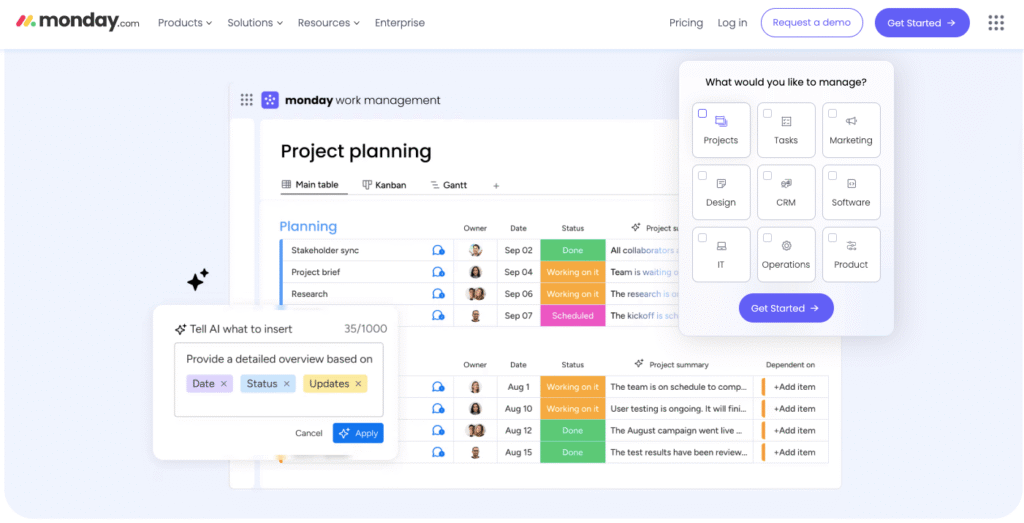
Remember digging through your inbox for that one important update? Yeah, Monday.com puts an end to that nightmare. They’ve built something that actually shows you what’s happening without making you hunt for it. Teams are switching over because they’re tired of staring at walls of text trying to figure out what’s going on. [1]
How Monday.com Supports Task and Workflow Automation
The real magic happens in the background:
- Tasks update themselves when they move along
- You get nudged about stuff before it’s late
- Quick-start templates that don’t waste your time
It handles the boring stuff while you focus on the work that matters.
Collaboration Benefits in Monday.com
No more “sorry, I missed that email” excuses. When everyone’s working in the same space, with comments and files right there in front of them, things just flow better. Plus, there’s this weird psychology thing, when people can see their tasks laid out clearly, they’re more likely to actually do them.
Customization Enhances Monday.com’s Usability
Ever tried forcing a square peg into a round hole? Monday.com doesn’t make you do that. Teams can set things up their way, and new folks can jump in without watching hours of training videos.
How ClickUp Integrates Task Management, Document Creation, and AI Assistance

ClickUp’s basically trying to be your whole office in one tab. They’ve taken regular task management and sprinkled in some AI that isn’t just there for show, it actually speeds things up, much like the polished blog post examples that keep workflows clear and engaging. [2]
Multi-view Options in ClickUp
Different strokes for different folks, right? ClickUp lets you pick your view:
- Lists for the spreadsheet lovers
- Kanban boards when you need that visual flow
- Calendar for deadline watchers
- Gantt charts for the project planning nerds
AI Features Improve Project and Writing Assistance
Think of the AI like a really efficient intern, it helps write clearer descriptions, summarizes those endless meeting notes, and even suggests your next move. It’s there when you need it, invisible when you don’t.
Customizing Collaboration Spaces
Everyone gets their own little corner of ClickUp to keep things from getting messy. You see what you need for your work, and the marketing team’s memes stay in their space where they belong.
How Obsidian Supports Non-linear Note-taking and Knowledge Visualization

Credits: Shu Omi
Ever tried organizing your thoughts in straight lines? Doesn’t work so well, right? That’s where Obsidian steps in, it’s built for people whose minds jump between ideas like a cat chasing laser dots. No rigid folders here, just notes that flow wherever your brain takes them.
Benefits of Non-linear Note-taking
Think of it like having string to connect any thought to another. Obsidian lets your ideas link back and forth, which means you’re not stuck forcing your brain into someone else’s organizing system.
Graph View Enhances Knowledge Exploration
The graph view’s pretty neat, it shows all your notes floating around like stars in a constellation, with lines connecting related ideas. Sure beats digging through folders trying to remember where you put stuff.
Who Benefits from Obsidian’s Knowledge Management?
If you’re the type who fills notebooks with random ideas or spends hours down research rabbit holes, you’ll probably love Obsidian. It’s perfect for people who need to connect dots between different concepts.
How Airtable Combines Database Power with Visual Project Management
Airtable’s like that friend who’s super organized but also knows how to make things look good. It mashes up spreadsheets with project tools in a way that actually makes sense.
Organizing Complex Information in Airtable
You can link stuff together in ways that’d make Excel cry. Need to track inventory while managing projects and keeping customer lists? Airtable’s got you covered.
Workflow Customizations in Airtable
Nobody’s business runs exactly the same way, so Airtable lets you bend the rules. Set up automations that match how your team actually works, not how some software developer thinks you should work.
Visual Data Representation Enhances Productivity
Sometimes you need to see things laid out on cards, other times you want a calendar view. Airtable lets you flip between views without losing any data.
How Asana and Trello Facilitate Task and Project Management
These two have been around the block a few times, and there’s a reason they’re still standing. They make task management feel less like pulling teeth, especially compared with some of the top task management software for agencies in 2026 that set the bar for efficiency.
Features Making Asana Suitable for Enterprise Use
Big companies love Asana because it handles the complicated stuff, detailed reports, fancy workflows, and keeping large teams from stepping on each other’s toes.
Trello’s Simplified Visual Project Planning
Trello’s basically digital sticky notes that anyone can figure out. Drag a card here, drop it there, done. Perfect for teams who don’t want to spend days learning new software.
Automation and Integration Improve Efficiency
Both tools play nice with other apps and can handle repetitive tasks on their own. No more copying and pasting between windows all day long.
How Privacy-Focused Alternatives Like Anytype and AFFiNE Empower User Control
Not everyone’s comfortable with their data floating around in someone else’s cloud. That’s where Anytype and AFFiNE come in, they’re built for folks who want to know exactly where their stuff lives.
Privacy Features in Anytype
Your data stays on your computer with Anytype, simple as that. When you need to share, it uses some pretty clever tech to keep things private while still letting you work with others.
AFFiNE Supports Privacy and Collaboration
Think of AFFiNE as the security-conscious cousin who also knows how to throw a party. You can draw on whiteboards and work together, but the code’s open for anyone to check, and your data stays where you put it.
Who Benefits from Privacy-first Alternatives?
These tools are perfect for anyone who’s ever lost sleep wondering where their company data ends up, think lawyers, healthcare folks, or just people who like keeping their business their business.
How Wiki-Building and Knowledge Management Tools Like Slite and Coda Enhance Team Productivity
Ever tried finding that one document everybody needs but nobody can locate? Slite and Coda fix that headache by making team knowledge bases that actually make sense, similar to the best internal documentation tools for teams in 2026 found across the market.
By the numbers: 62% of workers say they struggle with too much time spent searching for information during their workday, according to Microsoft’s Work Trend Index, which is exactly the problem a well-organized team wiki solves.
Slite Streamlines Document Organization
Finding stuff just became a whole lot easier with Slite’s search function. Their engineers probably spent countless hours fine-tuning it, and it shows – type in a keyword or two and the results pop up instantly.
Gone are the days of clicking through twenty different folders just to find that one meeting note from last month. The system’s pretty good at picking up related terms too, which means you don’t need to remember exact file names anymore.
Workflow Customizations in Coda
What’s really cool about Coda (renamed Superhuman Docs in July 2026, with the same features under a new name) is how it shape-shifts to match whatever you’re doing. One document might start off as meeting minutes, then suddenly you’re building spreadsheet formulas right there in the same space, and before you know it you’ve got a full-blown project management setup going.
It’s kind of like having a bunch of different apps merged into one, but without all the switching back and forth.
Balanced Usability and Collaboration
These tools hit that sweet spot between being simple enough for everyone to use and powerful enough to get real work done. The learning curve isn’t too steep – you won’t need to spend hours watching tutorials just to figure out the basics.
But when it comes to working together, that’s where they really shine. Multiple people can jump in, edit stuff, leave comments, and nothing breaks. Pretty impressive, considering how much is happening under the hood.
How Microsoft Loop and OneNote Integrate into the Microsoft Ecosystem
If you’re already living in Microsoft’s world, Loop and OneNote just make sense, they’re like the missing pieces of the puzzle. Loop also powers Copilot Pages in Microsoft 365 these days.
Collaborative Features of Microsoft Loop
Microsoft Loop’s taken that old headache of switching between apps and turned it into something that actually makes sense. Picture this: someone starts brainstorming in Teams chat, another person grabs that content and expands it in Word, then shoots it off through Outlook – and nobody’s copying and pasting like crazy.
The whole thing syncs up in real-time (most of the time, anyway), which means everyone’s looking at the same version. There’s something weirdly satisfying about watching your teammate’s cursor move across the screen while they’re editing from who knows where.
OneNote Enhances Note-taking
OneNote’s been around forever, and there’s a good reason for that. It’s like that kitchen drawer where you toss everything important – except it’s organized and you can actually find stuff.
Snap a picture of a whiteboard? Sure. Record a meeting? Go ahead. Scribble down some half-baked ideas at 3 AM? Perfect. The search function’s pretty smart too, it’ll dig through your handwritten notes (even the messy ones) and pull up exactly what you need. Plus, it works offline which is a lifesaver when the wifi decides to act up.
Complementary Tools in Productivity Suites
There’s something to be said for tools that just know how to play nice together. Loop and OneNote fit into the Microsoft ecosystem like they were born there – because, well, they were. You don’t have to use them together, but it’s kind of like having a full set of matching luggage instead of a bunch of random bags.
Everything just fits, the buttons are where you expect them to be, and your stuff moves between them without throwing a fit. For teams already using Microsoft’s other tools, it’s practically a no-brainer.
Practical Advice from Create & Grow
After comparing these tools, here’s the bottom line: pick what matches your style. If you’re all about visual task management, Monday.com or ClickUp’s your speed. Love connecting ideas? Obsidian might blow your mind. Worried about privacy? Check out Anytype or AFFiNE.
Sure, no tool’s perfect, but that’s not the point. Try a couple with actual work, not just demo projects. See which one feels natural, saves you time, and plays nice with your other apps. Sometimes the best fit isn’t the most popular choice, and that’s okay.
References
- https://www.geeksforgeeks.org/software-engineering/what-is-monday-project-management-software/
- https://techifysolutions.com/blog/enhance-project-management-with-ai/
Related Articles
- https://createandgrow.com/best-internal-documentation-tools-for-teams-in-2025/
- https://createandgrow.com/blog-post-examples/
- https://createandgrow.com/top-9-task-management-software-for-agencies-in-2025/
Frequently Asked Questions