
Your link request is sitting in an inbox nobody opens
I have sent a lot of cold emails to editors. Most of them went nowhere, and not because the pitch was bad. The editor got 200 messages that week, and mine was one more subject line sliding past the fold.
Link building and partnership outreach fail in the inbox for a simple reason. Everyone uses email, so every inbox looks the same. A stranger with a link request lands in the same pile as the newsletters, the vendor invites, and the ‘quick question’ follow-ups.
So the question I keep asking is not ‘how do I write a better email?’ It is ‘where does this person already pay attention?’ For a lot of editors, webmasters, and partner marketers, the answer is LinkedIn. They post there, they comment there, and they read direct messages there, often from people they recognize.
This article covers how to run link and partnership outreach on LinkedIn without turning your account into a spam machine. I will show you when the channel makes sense, how to structure three touches that do not beg for a link in the first message, how to scale the work safely, and how to tell when a campaign is failing and why.
When LinkedIn beats the inbox, and when email still wins
An editor who publishes under their own name, a webmaster who posts about their projects, and a marketer who runs everything in a startup are all easier to reach out on Linkedin than in a generic contact form on their website.
When choosing who to reach out to on Linkedin, I start from the company page, and see all the employees. If there is someone in charge of SEO, then that is the person I contact first, if there is not, then I try to find editors or marketers. They are either handling SEO on the side, or have freelancers who are in charge of backlinks.
But before you start doing Linkedin outreach, your profile needs to look legit. You have to have your picture, clear description of what you do, and more than 500 connections so you don’t look like a fake profile. Also, I would suggest you to skip writing the note when sending a connection request, as that one might backfire if it is not written well.
The main advantage of Linkedin is that it feels more personal, as it is a social media platform after all. And I think that notification on Linkedin is much harder to ignore, when it comes with a real face and real question.
Research before you request
My process starts with competitors’ backlinks, not with LinkedIn. I pull the backlink profiles of the competitors I care about in Ahrefs and export them. Every site that links to a competitor already covers the topic, which makes it a warm lead for a link.
Then I clean the export. I remove duplicates and the domains that clearly do not fit. Next, I compare the list against the sites that already link to us, because there is no point asking for a link we already have. What remains is the target list.
The enrichment work happens in Clay, handled by our GTM engineers. For each site, they find the name, surname, LinkedIn profile, position (SEO, editor, marketer) and email of the person behind it. If I cannot match a site to a real person, I drop it instead of guessing.
Personalization comes next, and I use it only when I have a concrete reason. My last campaign went to sites that had mentioned a tool that is no longer on the market. The message said the tool was gone and asked whether they would mention mine instead, and it linked to the article where they had written about the old one. The reason was real, the link was specific, and the ask was easy to understand.
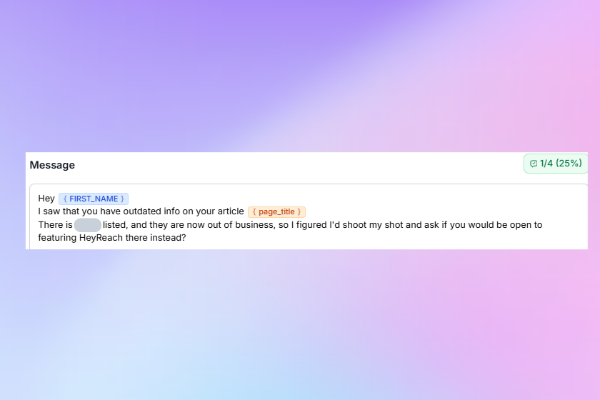
I run these campaigns in HeyReach because it handles the parts I would otherwise do by hand. It stops the same person from being messaged twice. It lets me add people and websites to a blocklist so I never contact them. And when people do not reply, I can pull them through the HeyReach MCP into a new list for a simple follow-up a month or two later.
Four touches that do not pitch on touch one
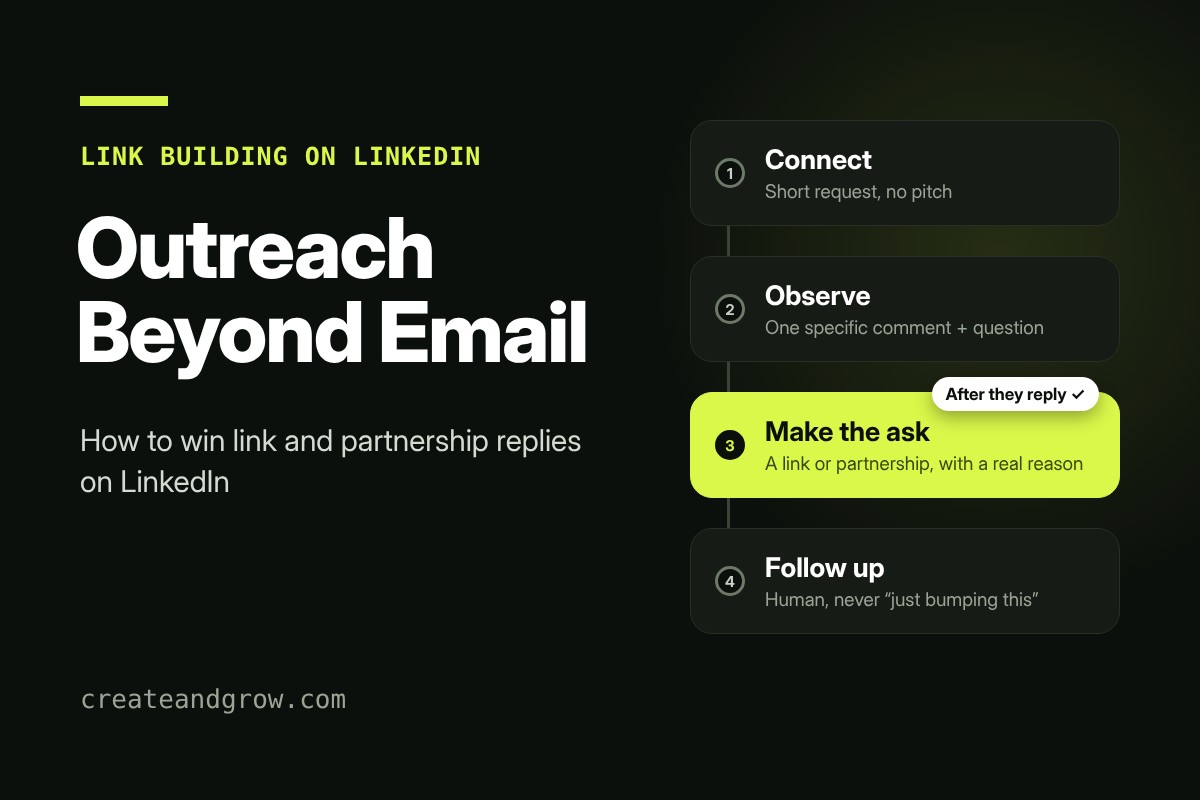
My sequence has three touches. In my campaigns, the ask can come earlier when it rests on a concrete reason, like the example above. Otherwise, I wait until the person replies before I make the ask.
Here is how the branches look like for my campaigns.
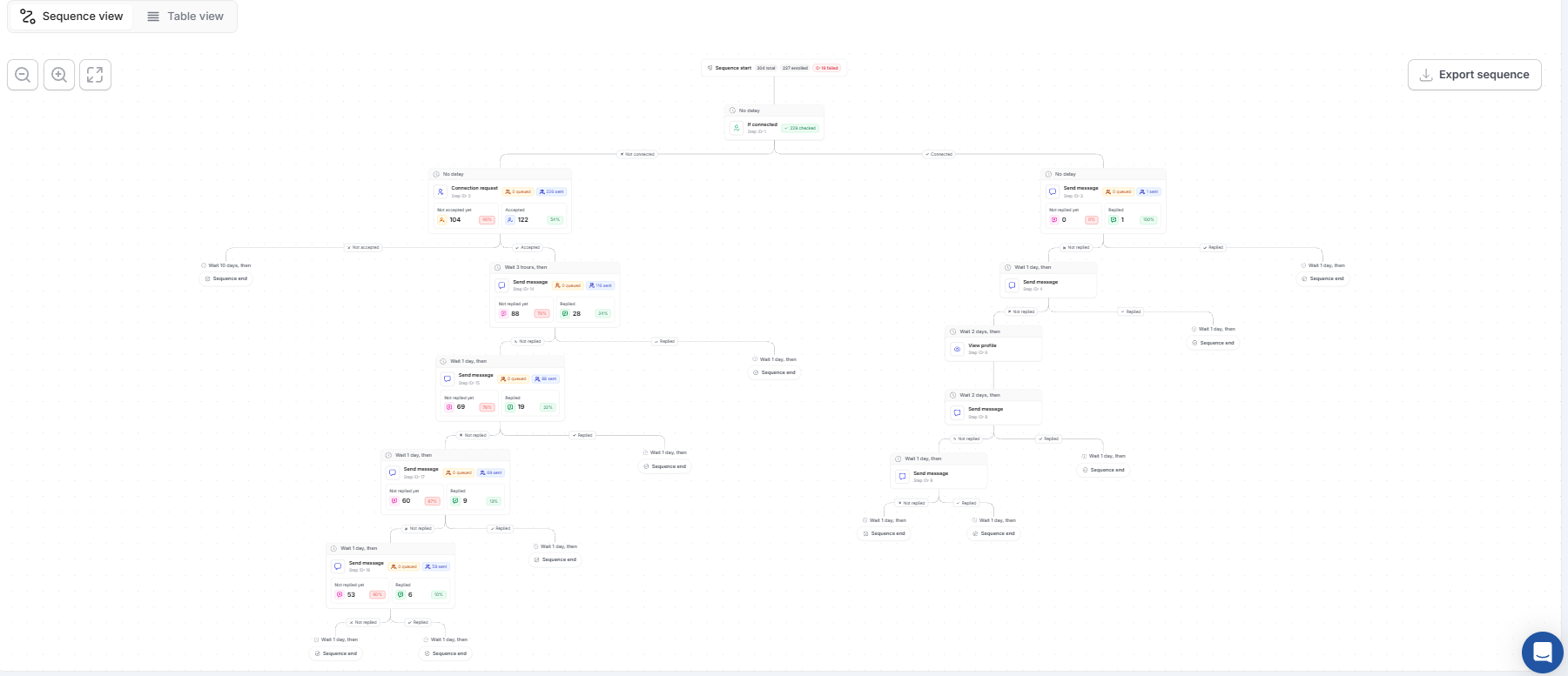
The first touch is the connection request. I keep it short and specific, or I skip the note altogether. Nobody accepts a request because it contains a paragraph of hope. In HeyReach’s benchmark report, we found that the typical campaign gets about one accepted connection for every five requests sent, so acceptance is a fair thing to expect but not a guarantee you can bank on.
The second touch is an observation. Once the request is accepted, I comment on one specific piece of the person’s work and ask one question about it. This is the step most campaigns get wrong, and it is where I put the most care.
The third touch is the ask. I send it only after the person replies, and I offer something concrete: a data point they can use, a case study that fits their audience, or a specific angle for a piece they are working on. If they prefer email from there, I move the conversation over.
The fourth touch is a follow up. I never say bumping this on top of your inbox, or anything like that. I tell them I understand that they are busy, and just tell them how I feel. Sometimes it is a meme, sometimes it is a pop culture reference.
Scaling the touches without breaking your account
Scale feels like the goal, but scale is where careful outreach turns into noise. I learned that the hard way. When I sent too many messages by hand, it was so daunting, and I also couldn’t always keep track of how many requests I was sending per day. Automation tools help you pace the sending. Some tools on the market set caps for you, so check what each one enforces before you trust it with your account. No tool guarantees your account is safe, so stay inside LinkedIn’s limits (100 messages per week for free accounts ).
In HeyReach’s benchmark report, acceptance drifted down as campaigns grew. Median acceptance went from 21.43% in campaigns with 50 to 100 requests to 19.35% in campaigns with more than 1,000. Reply rates stayed roughly flat over the same range. So bigger campaigns do not kill conversations. They tend to reveal list quality problems upstream. If your large campaign underperforms, check the list before you rewrite the message.
Diagnosing a weak campaign
When a campaign disappoints, I check the numbers in order, because the order tells you where to look.
Start with acceptance. In HeyReach’s benchmark report, the median campaign landed around 21% acceptance. Below roughly 13% is weak territory, and that usually points to targeting, list precision, or the sender profile. Fix those before you touch the copy. Rewriting a message for a list that never should have been built wastes a week. So go back to your ahrefs or semrush report, and change the competitor, or the page you are competing with. It might be that those backlinks were built with a larger budget than yours, so you are getting answers just about paid placements.
Then check reply rate and acceptance together. The median reply rate was about 22%. If Linkedin reply rate is low but acceptance looks healthy, the problem is almost always the second message. Read it as if you were the recipient. Is it specific to them? Does it give them a reason to respond? Does it ask one clear question?
If both acceptance and reply rate are low, I go back to the list. Targeting problems hide behind weak copy, and the copy gets the blame.
Finally, I compare the reply-to-acceptance conversion rate with the benchmark. The typical campaign converts about 18% of accepted connections into replies. Campaigns under roughly 10% are in the weak range, and that is where I look hardest at the messages sent after acceptance.
The order matters more than the tactics
Earn the connection with a relevant target. Earn the reply with a specific second message. Then scale what works. Doing it in reverse is how you end up with a big list, a full inbox of silence, and a sender account on a warning list.
Email still has its place, and I would not drop it. But for editors, webmasters, and partner marketers who spend their days on LinkedIn, a well-researched message there can get a conversation started that a cold email never would. Test it on a small list, measure the post-acceptance step, and let the numbers tell you where to go next.
FAQ
Is LinkedIn better than email for link building?
Not as a rule. Linkedin feels more personal, and it can build better start of a relationship, but the best is to combine these two in your outreach process.
How do I find editors and webmasters on LinkedIn?
Start with Sales Navigator filters around their beat, then check their recent posts and the sites they link to. Score each target on relevance and recent activity before you add them to a campaign.
How many touches should a link outreach sequence have?
Three works well for me: a connection request, an observation after acceptance, and the ask after a reply. Adding more touches before a reply usually adds annoyance, not results.
Can I automate LinkedIn outreach for partnerships?
You can automate the sending and the follow-up within LinkedIn’s limits. Keep the research and the first observation personal, because automation works best when the message still reads as if a person wrote it.
Is it safe to send link and partnership requests on LinkedIn?
It is safe when you stay within LinkedIn’s limits, avoid scraping and bots, and keep each message relevant to the person. The fastest way to get an account restricted is to send the same pitch to hundreds of people who never asked to hear it.
Related reading


