


Quick answer: The best AI video generators are Runway, Freepik, Synthesia, Veo (Google DeepMind), Sora (OpenAI), Kling AI, Adobe Firefly and Pika Labs. Runway, Veo, Sora and Kling are the strongest for realistic text-to-video clips, Synthesia is best for avatar and training videos, and Adobe Firefly is the safest choice for commercial use inside Adobe tools.
Black Friday AI Video Generator Deals 2026
Black Friday 2026 falls on 27 November and Cyber Monday on 30 November. This list covers 18 AI video generators that ran a Black Friday or Cyber Monday offer in 2025. For each one you get what the product does, last year’s offer, the regular price the vendor shows today and what to check before you buy.
Most Black Friday 2026 offers for AI video generators are not announced yet. This list shows what each tool offered for Black Friday and Cyber Monday 2025, starting with the tools reviewed below, so you know what to expect. Check the vendor page for current terms before you buy.
- 18 products are listed, each with the source where the 2025 offer was seen.
- Largest 2025 discounts on this list: Higgsfield (65%), Hailuo AI (MiniMax) (60%), OpenArt (60%), Freepik (50%).
- No vendor on this list has published a 2026 offer yet. Most are announced in November.
- Last checked: 5 October 2026. There are no affiliate links in this list.
All AI video generator deals in one table
Select a name to jump to the details.
| Product | Type | 2025 Black Friday deal | 2026 status | Regular price today |
|---|---|---|---|---|
| Freepik | AI creative suite | 50% off annual Premium, Premium+ and Pro plans (until 27 Nov 2025) | not announced yet | Premium shown at $20 per month, or $14.50 per month on annual billing (USD); Premium+ $45 and Pro Starter $110 per month |
| Kling AI | AI video | 50% off the first-year subscription, up to 40% extra credits on top-ups (from 17 Nov 2025) | not announced yet | see vendor site |
| Adobe Firefly | AI image and video | Firefly Pro 50% off for the first three months; Creative Cloud Pro 50% off the first 12 months (14 – 28 Nov 2025) | not announced yet | from $9.99 per month (Firefly Standard, 2,000 credits, USD); Firefly Pro $19.99, Pro Plus $49.99 and Premium $199.99 per month; free plan exists |
| Higgsfield | AI video | Up to 65% off annual plans plus one year of unlimited image generations | not announced yet | see vendor site |
| Hailuo AI (MiniMax) | AI video | 60% off yearly plans, up to 10,000 bonus credits | not announced yet | see vendor site |
| OpenArt | AI image and video | 60% off annual plans | not announced yet | Starter $14 per seat per month list price, shown at $13 on discount (4,000 credits per month, USD); Plus $34, Pro $56, Wonder $240 list |
| Fliki | AI video | 50% off yearly plans (from 23 Nov 2025) | not announced yet | free forever plan exists (3 credits per month, 720p, watermark); Standard and Premium prices did not load on the pricing page |
| Pictory | AI video | 50% off annual plans plus bonus AI credits (20 Nov – 2 Dec 2025) | not announced yet | from $29 per month (Starter, billed monthly, USD) or $25 per month billed annually; Professional $59 and Team $199 monthly; 14-day free trial |
| JoggAI | AI avatar video | 50% off Creator and Team annual plans (until 1 Dec 2025) | not announced yet | from $24 per month (Starter, USD) or $288 per year; Creator and Team plans cost more; free plan with 200 promotional credits |
| VEED | Online video editor | 45% off the annual Pro plan or 25% off 3 months of monthly Pro (until 30 Nov 2025) | not announced yet | see vendor site |
| PixVerse | AI video | Up to 40% off video plans | not announced yet | from $8 per month (Standard, billed monthly, USD) or $96 per year; Pro $24, Premium $48, Ultra $149 per month; free Basic plan exists |
| LTX Studio | AI video | 40% off annual plans | not announced yet | from $15 per month (Lite, billed monthly, USD) or $12 per month billed yearly; Standard $35, Pro $125 monthly; free plan with 800 one-time credits |
| CapCut | Video editor | 40% off the first month of CapCut Pro (new desktop users) (24 – 26 Nov 2025) | not announced yet | see vendor site |
| Elai | AI avatar video | 30% off any annual plan (20 – 30 Nov 2025) | not announced yet | from $29 per month (Creator, billed monthly, USD) or $23 per month billed annually; Team $125 per month; free plan with 1 minute per month |
| Vadoo AI | AI video | 30% off annual Pro or Advance plans (21 Nov – 5 Dec 2025) | not announced yet | from $19 per month (Starter, billed monthly, USD) or $15 per month billed yearly; Pro $39 and Advance $99 per month |
| Pollo AI | AI video | Up to 20% off the first subscription | not announced yet | see vendor site |
| Leonardo AI | AI image generator | 20% discount on all plans | not announced yet | from $12 per month (Essential, 8,500 fast tokens per month, USD); Premium $30 and Ultimate $60 per month; free plan with 150 tokens per day |
| Vidnoz | AI avatar video | $100 off the Business annual plan | not announced yet | see vendor site |
AI creative suite
Freepik
Freepik has been renamed Magnific, and freepik.com now redirects to magnific.com. The site describes an AI creative platform for generating and editing images, video and audio, combined with a library of more than 250 million stock photos, vectors, icons, templates, video and audio assets.

freepik.com, captured October 2026.
- AI image generator, editor, upscaler and background remover
- AI video generator, video editor and video upscaler
- Text to speech, sound effect and music generators
- Stock library with 250M+ assets
- Best for
- Designers and marketers who want stock assets and AI image, video and audio tools under one subscription.
- Regular price
- Premium shown at $20 per month, or $14.50 per month on annual billing (USD); Premium+ $45 and Pro Starter $110 per month (vendor pricing page, checked 5 October 2026)
- Before you buy
- Check the yearly credit allowance per plan, whether the price is for annual billing, and the 30-day refund terms stated on the pricing page.
Visit Freepik2025 offer seen at: medium.com
AI video
Kling AI
Kling AI is an AI video and image generator that turns text prompts, images and reference material into video clips and pictures; klingai.com now redirects to kling.ai. The site also lists motion control, an AI video editor, avatars and a node-based canvas workspace.

klingai.com, captured October 2026.
- Text-to-video and image-to-video generation
- Text-to-image and image-to-image with native 4K output
- Motion control for guiding movement in videos
- Canvas workspace with node editing and an AI agent
- Best for
- Creators who want to generate short AI video clips and images from prompts or reference images.
- Regular price
- No list price was readable on the vendor’s site on 5 October 2026. Check the pricing page before you compare the discount.
- Before you buy
- Membership prices could not be read from the site; check credit allowances, whether credits expire, and monthly versus annual billing before paying.
Visit Kling AI2025 offer seen at: radneurons.com
AI image and video
Adobe Firefly
Adobe Firefly is an AI creative app for generating and editing images, video, audio and designs with models from Adobe, Google, OpenAI, Kling AI and others. Paid plans run on monthly generative credits, and the tools include Generative Fill, Generative Expand and Firefly Boards.

adobe.com, captured October 2026.
- Text-to-image, image-to-image and sketch-to-image generation
- Video generation and editing
- Speech generation and audio translation
- Firefly Boards for mood boards and team collaboration
- Best for
- Designers and marketers, especially those already using Adobe apps such as Photoshop and Adobe Express.
- Regular price
- from $9.99 per month (Firefly Standard, 2,000 credits, USD); Firefly Pro $19.99, Pro Plus $49.99 and Premium $199.99 per month; free plan exists (vendor pricing page, checked 5 October 2026)
- Before you buy
- Adobe’s listed discounts apply to the first year only, so check the renewal price and the monthly generative credit allowance.
Visit Adobe Firefly2025 offer seen at: design-offset.com
AI video
Higgsfield
Higgsfield is an AI creative suite for making images, videos and voice content from text prompts or reference files. The site lists video and image generation with several models, editing and upscaling, video restyling, 3D generation, an effects library and studios for ads and marketing.

higgsfield.ai, captured October 2026.
- Image, video and voice generation from prompts or references
- Video restyling that transfers motion between scenes
- Effects library with presets
- Cinema Studio, Ads Studio and Marketing Studio
- Best for
- Social media creators and marketers producing short AI video and image content.
- Regular price
- No list price was readable on the vendor’s site on 5 October 2026. Check the pricing page before you compare the discount.
- Before you buy
- Plan prices could not be read from the pricing page; check credit limits, which models each plan includes and the billing period.
Visit Higgsfield2025 offer seen at: aimojo.io
AI video
Hailuo AI (MiniMax)
Hailuo AI is an AI video and image generation site for creators. According to its homepage, you can create videos and images from text or photos, turn images into video, and use audio tools, style transfer effects and ready-made templates for particular types of content.

hailuoai.video, captured October 2026.
- Video generation from text or photos
- Image generation and image-to-video
- Audio tools and style transfer effects
- Templates such as LoveFrame, PetPal and PlayFun
- Best for
- Creators who want quick AI video clips and images from text prompts or photos.
- Regular price
- No list price was readable on the vendor’s site on 5 October 2026. Check the pricing page before you compare the discount.
- Before you buy
- Subscription prices could not be read from the site; check credit allowances and the billing period on the Subscribe page before buying.
Visit Hailuo AI (MiniMax)2025 offer seen at: medium.com
AI image and video
OpenArt
OpenArt is an AI creation platform for generating images, videos, music and audio, with more than 100 models from Google, OpenAI, Seedance and others. It also offers consistent characters across scenes, video editing tools and a Director tool for storyboarding and scene direction.

openart.ai, captured October 2026.
- 100+ AI models for images, video, music and audio
- Character creation with consistency across scenes
- Video up to 15 seconds and up to 4K
- Director tool for storyboards and Smart Shot cuts
- Best for
- Creators who want many image and video models and consistent characters in one credit-based account.
- Regular price
- Starter $14 per seat per month list price, shown at $13 on discount (4,000 credits per month, USD); Plus $34, Pro $56, Wonder $240 list (vendor pricing page, checked 5 October 2026)
- Before you buy
- Check whether the shown price needs annual billing, the monthly credit allowance, and that commercial use rights start at the Plus plan.
Visit OpenArt2025 offer seen at: medium.com
AI video
Fliki
Fliki is an AI video generator that turns text, scripts and blog posts into finished videos with AI voiceovers. The site says it offers more than 2,000 AI voices in over 80 languages, along with AI avatars, voice cloning, video translation and automatic captions.

fliki.ai, captured October 2026.
- Text, blog and slide deck to video conversion
- 2,000+ AI voices in 80+ languages
- Voice cloning, AI avatars and digital twins
- Video translation, dubbing and auto-captions
- Best for
- Bloggers, marketers and educators who want narrated videos made from written content.
- Regular price
- free forever plan exists (3 credits per month, 720p, watermark); Standard and Premium prices did not load on the pricing page (vendor pricing page, checked 5 October 2026)
- Before you buy
- Check monthly credits, maximum export length and voice-clone limits per plan, and that the advertised 40% code applies to annual plans only.
Visit Fliki2025 offer seen at: fliki.ai
AI video
Pictory
Pictory is an AI video generator that converts text, blog posts, scripts, URLs, slide decks, images, screen recordings and existing videos into edited videos. It adds captions, AI voices, AI avatars and templates automatically, and includes a brand kit and tools for cutting highlights and clips.

pictory.ai, captured October 2026.
- Text, URL, PPT and image to video
- Automatic captions and multi-language voice dubbing
- AI avatar generator and AI script generator
- Highlight and clips auto-generation from long videos
- Best for
- Marketers, course creators and bloggers repurposing written content and long recordings into short videos.
- Regular price
- from $29 per month (Starter, billed monthly, USD) or $25 per month billed annually; Professional $59 and Team $199 monthly; 14-day free trial (vendor pricing page, checked 5 October 2026)
- Before you buy
- Pictory states it does not offer refunds on paid subscriptions, so test the free trial first and check the video-minute limit.
Visit Pictory2025 offer seen at: fliki.ai
AI avatar video
JoggAI
JoggAI is an AI video generation platform that creates videos with lifelike AI avatars, so you can produce content without filming. It offers stock and custom avatars, talking photos, URL-to-video and product videos, video translation, voice cloning and AI script writing.

jogg.ai, captured October 2026.
- 450+ stock avatars plus custom and photo avatars
- URL-to-video and product video generation
- Video translation and lip-sync
- AI voice cloning and script writing
- Best for
- E-commerce sellers and marketers making avatar-led product and ad videos without filming.
- Regular price
- from $24 per month (Starter, USD) or $288 per year; Creator and Team plans cost more; free plan with 200 promotional credits (vendor pricing page, checked 5 October 2026)
- Before you buy
- Check the credit allowance and maximum video length per plan, the number of custom avatars, and monthly versus annual billing terms.
Visit JoggAI2025 offer seen at: kripeshadwani.com
Online video editor
VEED
VEED is an online AI video creation and editing platform where you generate and edit in one workflow. The site lists talking-head AI avatars, automatic subtitles, video translation and dubbing, voice cloning, a screen recorder, a teleprompter and a brand kit for consistent styling.

veed.io, captured October 2026.
- Auto subtitle generator
- AI avatars and text-to-video generation
- Video translator and AI dubbing
- Screen recorder, teleprompter and brand kit
- Best for
- Marketers and teams who edit, subtitle and translate videos in the browser.
- Regular price
- No list price was readable on the vendor’s site on 5 October 2026. Check the pricing page before you compare the discount.
- Before you buy
- Plan prices could not be read from the pricing page; check per-user pricing, subtitle and AI usage limits, and annual versus monthly billing.
Visit VEED2025 offer seen at: cybernaira.com
AI video
PixVerse
PixVerse is an AI video generation platform that creates videos from text prompts and images. The site also lists a template library, lip sync, character consistency tools, a node-based canvas for building workflows, a conversational agent and a Marketing Hub for making short ad videos.

pixverse.ai, captured October 2026.
- Text-to-video and image-to-video generation
- Template library and lip sync
- Character consistency tools
- Canvas node-based workflow builder
- Best for
- Social media creators and marketers who want short AI clips made from prompts or images.
- Regular price
- from $8 per month (Standard, billed monthly, USD) or $96 per year; Pro $24, Premium $48, Ultra $149 per month; free Basic plan exists (vendor pricing page, checked 5 October 2026)
- Before you buy
- Check monthly credits and maximum resolution per plan (Standard is capped at 720P) and whether you are buying monthly or yearly.
Visit PixVerse2025 offer seen at: medium.com
AI video
LTX Studio
LTX Studio is an AI video production studio for filmmakers, marketers and creative teams; ltx.studio now redirects to ltx.io/studio. It turns scripts, text and images into video and includes a storyboard generator, camera and keyframe controls, consistent characters and a timeline editor.

ltx.studio, captured October 2026.
- Script-to-video, text-to-video and image-to-video
- AI storyboard generator and pitch deck generator
- Camera movement and keyframe motion control
- Consistent characters, objects and locations
- Best for
- Filmmakers, agencies and marketing teams planning and producing storyboarded AI video.
- Regular price
- from $15 per month (Lite, billed monthly, USD) or $12 per month billed yearly; Standard $35, Pro $125 monthly; free plan with 800 one-time credits (vendor pricing page, checked 5 October 2026)
- Before you buy
- Lite is licensed for personal use only; commercial use starts at Standard. Refunds are typically within 14 days if under 1,200 credits used.
Visit LTX Studio2025 offer seen at: medium.com
Video editor
CapCut
CapCut is a photo and video editing platform with AI tools, available on desktop, mobile and the web, aimed at content for YouTube, Instagram and similar channels. It includes a video editor, templates, automatic captions, background removal, text to speech and AI image and video generators.

capcut.com, captured October 2026.
- Video editor with trimming and transitions
- Auto caption and subtitle generator
- Background removal for images and video
- Templates for TikTok, Reels and business content
- Best for
- Social media creators who edit short videos on a phone, desktop or in the browser.
- Regular price
- No list price was readable on the vendor’s site on 5 October 2026. Check the pricing page before you compare the discount.
- Before you buy
- Prices were not shown on the pages opened; check which features need a paid plan and whether billing is monthly or annual.
Visit CapCut2025 offer seen at: allthings.how
AI avatar video
Elai
Elai is an AI video generator for producing training and marketing videos with AI avatars instead of outsourced video production. The site lists 80+ avatars, voice cloning in 28 languages, support for 75+ languages, one-click translation and conversion of PowerPoint files and articles into videos.

elai.io, captured October 2026.
- 80+ AI avatars plus custom avatar creation
- Voice cloning in 28 languages
- PPTX-to-video and article-to-video conversion
- One-click video translation in 75+ languages
- Best for
- Learning and development teams and marketers making avatar-led training videos in several languages.
- Regular price
- from $29 per month (Creator, billed monthly, USD) or $23 per month billed annually; Team $125 per month; free plan with 1 minute per month (vendor pricing page, checked 5 October 2026)
- Before you buy
- Check the video minutes included per month (15 on Creator), the $2 extra-minute rate, and that custom avatars and voice cloning cost extra.
Visit Elai2025 offer seen at: fliki.ai
AI video
Vadoo AI
Vadoo AI describes itself as an all-in-one AI video generator built for short-form content such as TikToks, Reels, Shorts and podcasts. It covers AI scriptwriting, text-to-video and image-to-video, captions, voiceovers, B-roll and auto-posting, using models including Kling, Veo3, Hailuo, Pika, Luma and Runway.

vadoo.tv, captured October 2026.
- AI scriptwriting and text-to-video
- Captions, voiceovers and B-roll generation
- Video-to-video restyling in 30+ animation styles
- Auto-posting to social channels
- Best for
- Creators and agencies producing short-form faceless videos for social channels at volume.
- Regular price
- from $19 per month (Starter, billed monthly, USD) or $15 per month billed yearly; Pro $39 and Advance $99 per month (vendor pricing page, checked 5 October 2026)
- Before you buy
- Check the monthly video cap (20 on Starter), maximum video length per plan, and the linked refund policy before paying yearly.
Visit Vadoo AI2025 offer seen at: blog.coupler.io
AI video
Pollo AI
Pollo AI is an AI creative suite for video, image, avatar and audio work that gives access to several models in one place, including Sora, Kling, Seedance, Wan, MiniMax and Veo. It also has an agent for end-to-end content creation and a Marketing Studio for ads.

pollo.ai, captured October 2026.
- Text-to-video and image-to-video with multiple AI models
- AI image generation, editing and upscaling
- Talking avatars, voice cloning and text to speech
- Marketing Studio for ads, UGC videos and product visuals
- Best for
- Creators and marketers who want to try several video models from one credit-based account.
- Regular price
- No list price was readable on the vendor’s site on 5 October 2026. Check the pricing page before you compare the discount.
- Before you buy
- Unused subscription credits do not carry over, and refunds for subscription credits must be requested within 3 days of first purchase.
Visit Pollo AI2025 offer seen at: medium.com
AI image generator
Leonardo AI
Leonardo.AI is a generative AI platform for creating images, art and video, aimed at marketing and design teams scaling content production. It offers image generation from prompts or custom models, video creation, image editing and upscaling, with a choice of several AI models and a developer API.

leonardo.ai, captured October 2026.
- Image generation from prompts or custom models
- Video creation with AI animation and motion tools
- Upscaling to raise resolution for print
- Developer API
- Best for
- Designers, marketers and game artists who generate images in volume and want custom-trained models.
- Regular price
- from $12 per month (Essential, 8,500 fast tokens per month, USD); Premium $30 and Ultimate $60 per month; free plan with 150 tokens per day (vendor pricing page, checked 5 October 2026)
- Before you buy
- Check the monthly token allowance and token bank cap, and whether the price shown is for monthly or yearly billing.
Visit Leonardo AI2025 offer seen at: kripeshadwani.com
AI avatar video
Vidnoz
Vidnoz is an AI video generation platform for creating videos without a camera crew or studio. The site lists more than 1,900 AI avatars, 2,000 AI voices with voice cloning, 2,800 video templates, video translation in over 140 languages and custom avatars made from photos or videos.

vidnoz.com, captured October 2026.
- 1,900+ AI avatars with lip-sync
- 2,000+ AI voices and voice cloning
- 2,800+ video templates
- AI video translation in 140+ languages
- Best for
- Small businesses and trainers who need avatar-presented videos on a small budget.
- Regular price
- No list price was readable on the vendor’s site on 5 October 2026. Check the pricing page before you compare the discount.
- Before you buy
- The 7-day refund covers 1-year subscriptions only, not 1-month ones, and unused credits do not carry over.
Visit Vidnoz2025 offer seen at: kripeshadwani.com
How to use these Black Friday deals
- Compare the sale price with the regular price in each card, not with a crossed-out list price. Some vendors show a first-year discount all year.
- Check what you pay at renewal. Many offers apply to the first billing period only.
- Match the plan limits (seats, sites, credits, contacts) to what you use today, then decide if a longer term is worth it.
- Lifetime plans depend on the vendor staying in business. Read the refund terms before you pay.
- Buying software for a site? See also our Black Friday WordPress deals and Black Friday hosting deals.
Questions about Black Friday AI video generator deals
When do Black Friday AI video generator deals start in 2026?
Black Friday is on 27 November 2026 and Cyber Monday on 30 November 2026. In 2025 many software vendors opened their offers one to two weeks earlier and kept them open into the first days of December.
Are these 2026 deals?
Not yet. Each card shows the 2025 offer and marks the 2026 status. We replace last year’s offer as soon as the vendor confirms a new one.
How are the deals checked?
Every offer links to the page where it was seen: the vendor’s own page or a dated roundup. Regular prices come from each vendor’s pricing page, read on 5 October 2026. Where a price was not readable, the card says so.
How can a vendor get listed?
Listing is free. Send the tool name, the offer, the dates and a link through the contact page.
More Black Friday deal lists
- All Black Friday deals lists
- Black Friday AI Tools for YouTube Creators deals
- Black Friday AI Voice Generator deals
- Black Friday Podcast Recording Software deals
- Black Friday AI Meeting Summary Tools deals
- Black Friday WordPress deals
- Black Friday Hosting deals
- Black Friday Lifetime deals
Deals change and can end early. Check the final price on the vendor’s site before you buy.
Want your deal on this list?
Listing is free. Send us the tool name, the offer, the dates and a link. We check it and add it.
Contact usAI video generators are pretty innovative tools that utilize artificial intelligence to create high-quality videos from text or images. They enable users to easily produce videos quickly, often without the need for filming, editing, or expensive equipment. Statista reported that global revenue from AI in marketing was expected to reach around $47 billion in 2025, with projections indicating it could exceed $107 billion by 2028.
The world of AI video generation is an entire ecosystem of cutting-edge platforms. You’ll find all of the best AI video generators of 2026 listed just below. So, which AI video generation software should you trust with your next big idea?
| Tool | Best For | Free Plan | Starting Price (Billed annually) |
| Runway | Filmmakers, creative professionals | Yes (Includes 125 credits – one time) | $12/user/month (includes 625 credits monthly) |
| Freepik (now Magnific) | Beginners, marketers, and creators | Yes (No access to generative features) | $14.50/month (Premium, 240,000 AI credits/year) |
| Synthesia | AI avatars, corporate training, explainer videos | Yes (10 minutes of video/month) | $29/month on monthly billing (lower with annual billing) |
| Veo (Google DeepMind) | Professional video production, cinematic quality | No | $19.99/month (Google AI Pro; Google AI Plus is $4.99/month with limited access) |
| Sora (OpenAI) | Discontinued in 2026 (kept here for reference) | No | Not available (app closed April 26, 2026) |
| Kling AI | Realistic motion, facial animation | Yes (66 credits daily) | $79.20/year (Standard) |
| Adobe Firefly | Designers, marketers | Yes (Free daily generations) | $9.99/month (2,000 monthly generative credits) |
| Pika Labs | Short-form content, animations, ideation | Yes (no monthly credits, credit packs only) | $8/month (900 monthly credits) |
1. Runway
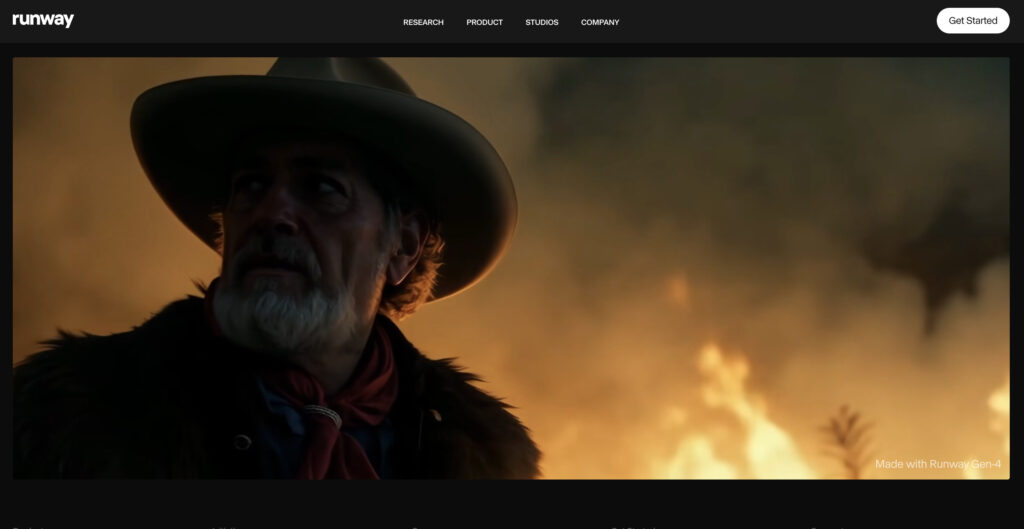
Runway Gen-4, and the newer Gen-4.5 that is now Runway’s flagship model, is the next leap in AI-powered media creation, offering advanced consistency across characters, scenes, and cinematic elements. It gives creators precise control over style and continuity.
We were very impressed with Runway’s generation capabilities. Gen-4 brings expressive storytelling, style coherence, and creative control to the forefront of AI filmmaking. From our own experience, Gen-4 empowers users to produce high-fidelity video content.
Pros of Runway
Runway Gen-4 makes good on its promise of controllable, consistent video generation. The ability to regenerate scenes from different perspectives, maintain character identity across shots, and repurpose footage with new styles puts it at the top tier of creative AI tools.
The “Multi-Motion Brush” and “Camera Control” features are super great for directing motion and scene flow, allowing a level of expressiveness previously limited to manual editing. In addition, the reference-based generation bridges the gap between imagination and execution faster than many other tools.
Cons of Runway
However, Runway still has some maturing to do. Its generative capabilities are impressive, but the user interface often gets in its own way. And though Gen-4 addresses many of Gen-3’s fidelity issues, achieving professional-grade results still requires iteration, patience, and experience.
2. Freepik
Freepik’s AI Video Generator is a popular tool in AI content creation. As an all-in-one creative suite, it brings together cutting-edge video generation models like Google Veo, Runway, MiniMax Hailuo, and PixVerse under one easy-to-use platform. Note that Freepik rebranded as Magnific on April 28, 2026, so you will now find the same tool under the Magnific name.
With options for text-to-video, image-to-video, and character consistency, it caters to creators ranging from casual users to professionals.

Pros of Freepik
Freepik stands out for its user-friendly interface, making it accessible even to beginners. The platform’s integration of multiple leading AI models gives users the flexibility to experiment with different video styles.
It also ties seamlessly into Freepik’s wider ecosystem of tools, including custom characters, styles, music, and AI voice generation. The customization options, such as defining shot types, transitions, and lip-sync integration, provide a surprising degree of creative control.
Cons of Freepik
Its credit-based model can be restrictive, with users often running out of credits quickly if the initial generation doesn’t meet expectations. Another common issue is slow generation speed, where videos may take much longer than the promised timeframe. Finally, some find its content filters overly strict, with safe but creative outputs occasionally being flagged or blocked.
3. Synthesia
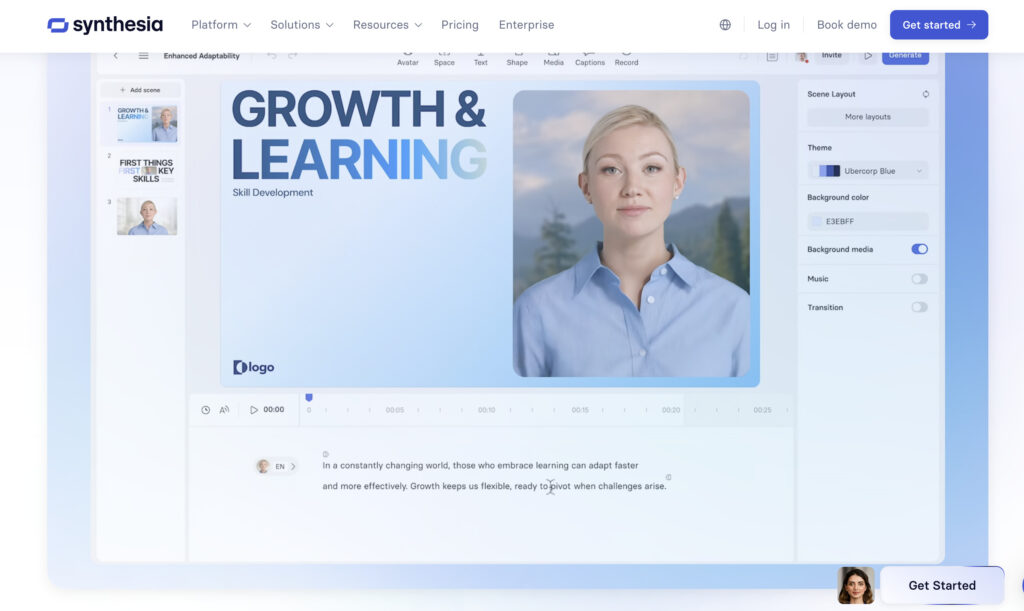
Now, Synthesia stands as one of the most mature platforms in the space, especially for enterprises and educators. With hundreds of avatars and voiceovers in 160+ languages, it’s a complete platform for turning text into polished videos.
Synthesia is packed with enterprise-level features like SCORM export, brand kits, and security compliance. And despite its priority on business use cases, individual creators can generate free videos with a free Basic plan that includes 10 minutes of video per month.
Pros of Synthesia
Synthesia offers one of the most intuitive workflows for AI video generation. You can start with a script or a link, choose an avatar, pick a voice, and get a studio-quality video in minutes. The AI Avatars are really expressive.
Cons of Synthesia
Facial expressions and mouth movements still feel somewhat mechanical, especially during technical or fast-paced dialogue. The platform’s interface, while user-friendly, is often restrictive when it comes to customization. Advanced features, including 4K export and extended video durations, are locked behind enterprise plans.
4. Veo (Google DeepMind)
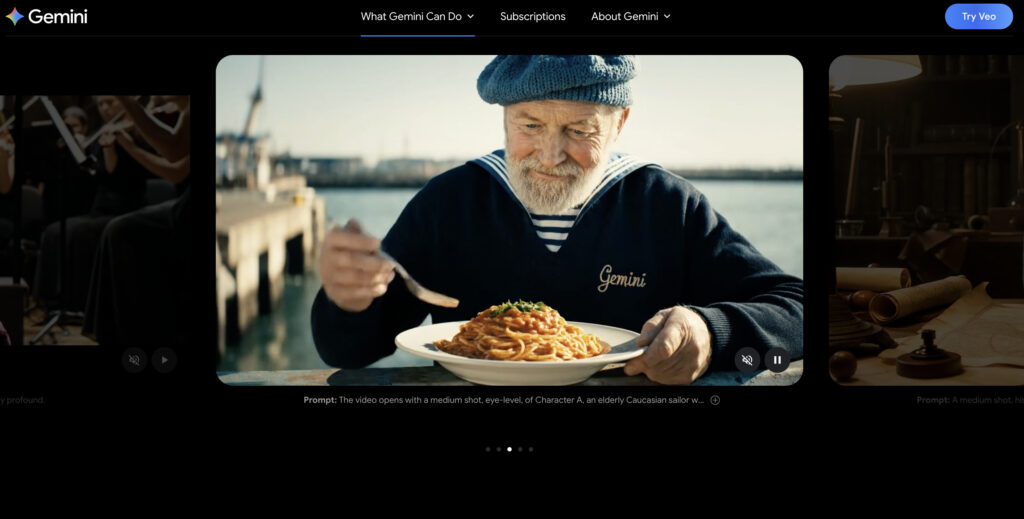
Going by its features, the Google Veo 3 video generator is deeply impressive in what it offers: ultra-realistic short video clips with synchronized audio, generated from a single prompt.
The platform is optimized for speed and cinematic realism. Veo 3 is really good at rendering small, detailed objects in motion (water droplets or diced onions) with near-photorealistic clarity. Even more impressive is the real-time audio generation, which brings another layer of immersion to the results. Since our test, Google has moved on: Veo 3.1 followed Veo 3, and in 2026 Google introduced Gemini Omni, which replaces Veo inside the Gemini app and creates 10-second videos with native audio.
Pros of Veo
Veo 3’s visual fidelity and sound syncing are a step above anything Google has offered before, and its predecessor, Veo 2. The AI handles complex textures and dynamic scenes with remarkable accuracy. And the quick generation time makes it ideal for rapid ideation.
Used ethically, it can be a powerful tool for storytelling and marketing. With Gemini’s multimodal backbone, Veo also integrates seamlessly into creative workflows spanning text, image, and video.
Cons of Veo
You need a paid Google AI subscription to use it, with the highest limits reserved for the Ultra plans (from $99.99/month), and its moderation tools remain underwhelming.
Also read Best Tools for AI Meeting Summaries
5. Sora (OpenAI)
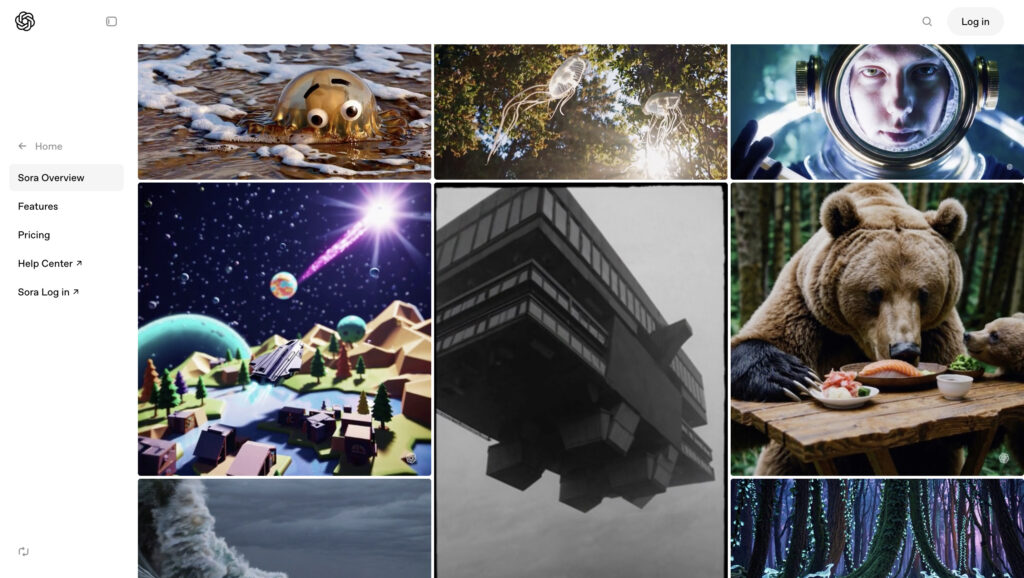
2026 update: OpenAI has discontinued Sora. The Sora web and app experiences closed on April 26, 2026, and the Sora API was discontinued on September 24, 2026, so you can no longer sign up for it. We are keeping our original notes below for reference. Sora was OpenAI’s creative video generation tool, and it wasn’t aiming to help you produce a full-length movie. It was really effective for crafting short, vivid scenes in seconds. Its interface was polished and beginner-friendly, with features like Remix for reimagining existing content or Storyboard for arranging clips.
Sora excelled in experimental storytelling, especially with its stylish preset looks like “Paper Craft,” “Film Noir,” and more. It was included in ChatGPT Plus and Pro plans, which made it widely accessible to creators already using the ecosystem.
Pros of Sora
One of Sora’s standout things was speed. Many AI video tools took at least 10 minutes to render a scene, whereas Sora often delivered within 5. The prompt editing and remix functions made it ideal for collaborative or iterative creation, and the visual fidelity was impressive for a tool that took less than a minute to prompt.
Cons of Sora
The biggest con today is simple: Sora is no longer available. When we tested it, videos were capped at 10 seconds for Plus users and 20 seconds for Pro, and prompt usage was capped monthly. If Sora was part of your workflow, the other tools on this list are the alternatives to look at.
6. Kling AI
We think Kling AI is somewhere between the technical power of Google’s Veo 3 and the flexibility of creative tools like Runway. It gives users ultimate creative control and the ability to upload specific elements into their scene. It’s designed for generating a cool video from text and for orchestrating entire sequences, transitions, and styles with precision.

Pros of Kling AI
Kling AI’s biggest advantage is its deep creative control. You can set your own start and end frames, control how elements interact, and add movement where you want it. It’s ideal for artists who want to build unique sequences in 3D, anime, or realistic styles. In addition, its streamlined storytelling workflow is really useful.
Cons of Kling AI
Of course, such control comes with a learning curve. Kling AI isn’t as plug-and-play as tools like Synthesia. It assumes a level of visual literacy, so if you’re looking to generate quick content for social media, it might be more tool than you need. And because its support documentation and user community content have been a bit thin compared to more established names.
7. Adobe Firefly
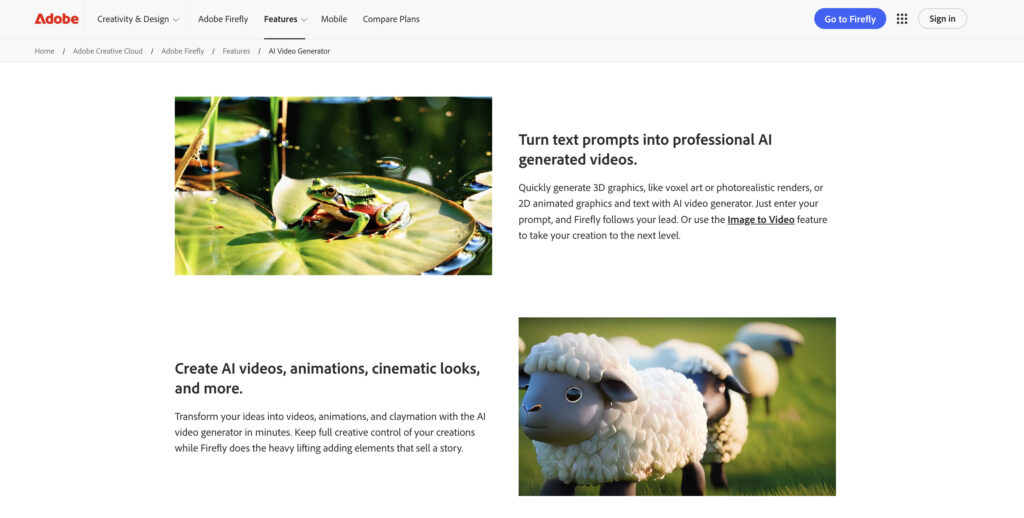
Adobe Firefly is shaping up to be the ultimate creative AI companion. The platform offers a seamless ecosystem for generating video and images. With features like text-to-video, AI-assisted translations, and reference-based sound effect creation, Firefly covers nearly every creative workflow.
Overall, Adobe’s platform stands out for its commercial safety, user-friendliness, and the sheer breadth of content types it can generate, all without compromising your IP rights.
Pros of Adobe Firefly
The tool thrives in ideation and rapid content creation. Adobe Firefly offers an intuitive and well-integrated creative space. It’s especially well-suited for marketers, designers, and social media teams.
Cons of Adobe Firefly
Firefly is truly efficient, but its creative ceiling still feels a bit capped for professionals. The platform struggles with complex prompts, especially in scenes involving realistic humans or intricate interactions. A lack of advanced customization and control compared to niche AI tools. Output resolution for print work still lags, and some workflows, such as animation or nuanced scene control, remain simplified.
8. Pika Labs
In any case, Pika is a standout in short-form AI video generation. When we tested Pika 2.2, it impressed us with its 10-second clip length, upgraded 1080p resolution, and Pikaframes (the current model is Pika 2.5). These keyframe transitions allow creators to animate transformations between two images over any duration between 1 and 10 seconds, delivering smooth, intelligent motion.
Pika’s interface is intuitive, and its prompt input system and visual presets make it easy for newcomers to start creating dynamic video content in minutes. The short render times and impressive output quality make it a favorite among creators experimenting with storyboarding or short ads.

Pros of Pika Labs
The jump to 1080p makes Pika’s output significantly more professional. Meanwhile, Pikaframes lets users control animation transitions like never before. It handles prompt fidelity well and generates smooth motion between images, especially when subjects are visually similar. The tool’s rapid generation time and ability to swap subjects or set camera angles mean it’s accessible without sacrificing creative depth.
Cons of Pika Labs
Short clip lengths keep it focused on short-form use cases, and the free plan no longer includes monthly credits. While this is fine for quick clips, ads, or animated transitions, it limits the app’s usefulness for long-form storytelling or multi-scene production. Pikaframes is powerful, but doesn’t yet offer the same level of nuance or flexibility as more complex motion-transfer tools.
Conclusion
Of course, if you’re looking for the absolute best tools in AI video generation right now, then these options are powerful and can turn heads with what they can produce. The question is, do you need high-end realism and granular control, or will a streamlined solution better fit your workflow?
Frequently Asked Questions
Related reading