
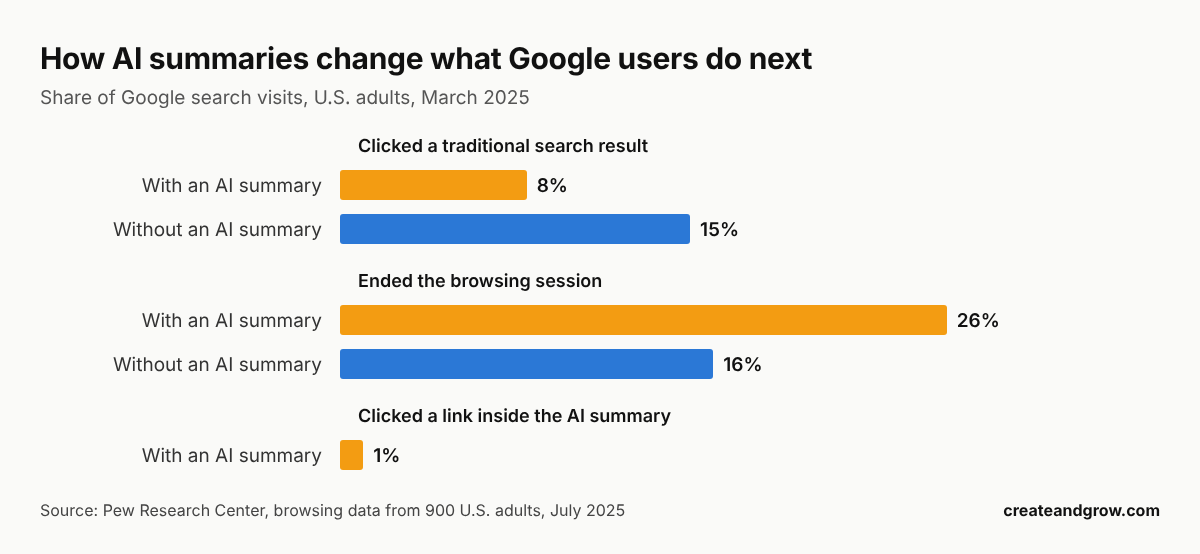
Your total traffic can look healthy while your most valuable pages lose visitors. That matters because rankings no longer tell the whole story. In Pew Research Center’s analysis of March 2025 browsing data from 900 U.S. adults, users clicked traditional Google results on 8% of visits with AI summaries, compared with 15% without them.
Those findings do not explain every decline. They show why your audit needs to connect search visibility with what real visitors do next. This guide walks you through a practical audit: how to find the pages that matter, price each loss in missed conversions, diagnose the real cause and measure recovery without fooling yourself.
Key numbers before you start
- 68% of US Google searches ended without a click in January to April 2026, up from 60% in 2024. (Source: SparkToro)
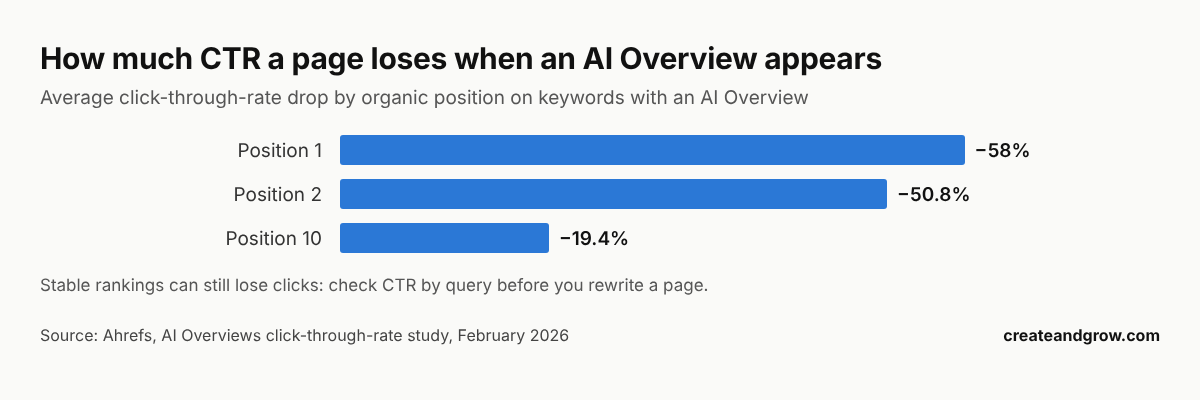
- 58% lower CTR for the page ranking first when an AI Overview appears. (Source: Ahrefs, 2026)
- 26% vs. 16%: users ended their browsing session more often on Google pages with an AI summary than on pages without one. (Source: Pew Research Center)
- 120% more clicks per impression for brands cited inside an AI Overview than for uncited brands on the same results page. (Source: Seer Interactive)
More data: our zero-click search statistics and AI search statistics roundups.
In this guide
- Identify the traffic that supports your business
- Build a recovery plan around conversion value
- Separate visibility loss from click loss
- Match your fix to the evidence
- Measure recovery without creating new problems
- A 60-minute traffic loss audit checklist
- FAQ
Identify the Traffic That Supports Your Business
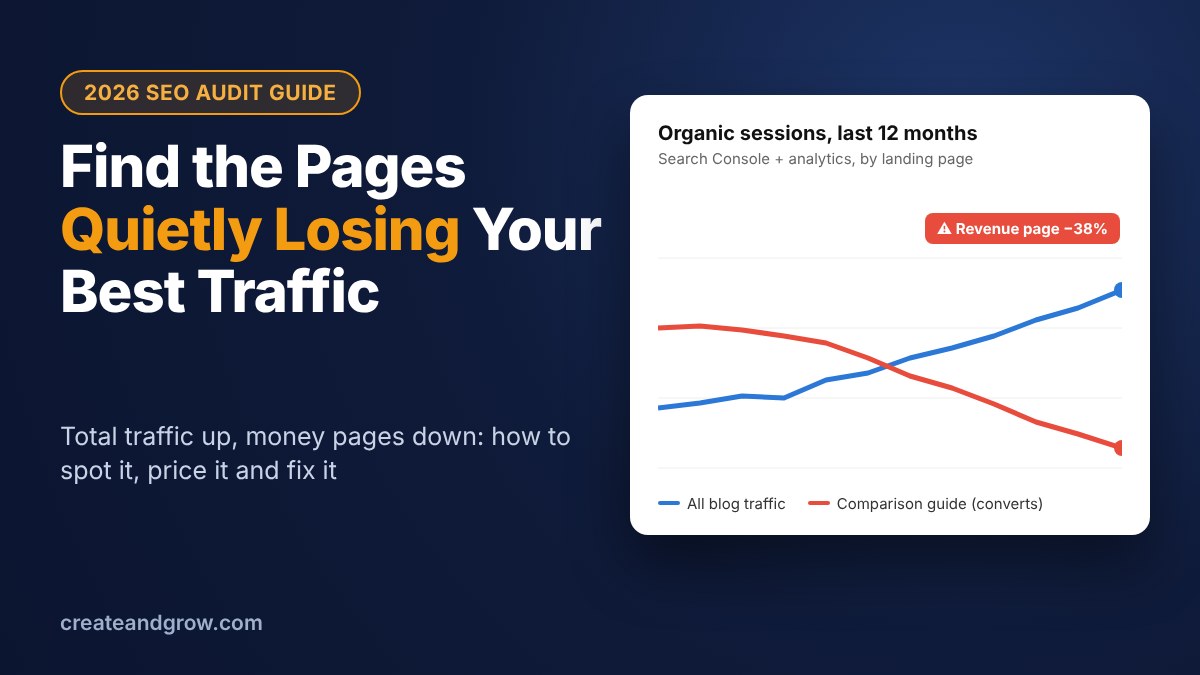
A large traffic drop does not always deserve your first response. A glossary article might attract thousands of casual readers, while a smaller comparison page helps buyers choose your product. If new informational posts grow, they can hide a decline in pages that produce inquiries or sales.
For example, your blog could gain visitors overall while its software comparison guide loses qualified readers. Your headline traffic report would look positive, but your business would receive fewer opportunities.
You can define valuable traffic through a specific business action, such as a qualified inquiry, purchase, or newsletter signup. In your analytics platform, compare organic landing pages, the pages visitors first reach through unpaid search, against those actions. This gives your audit a business purpose instead of treating every click as equal.
A simple way to start is to sort your pages into three groups before you look at any decline:
| Page type | Typical examples | What a loss costs you | Audit priority |
|---|---|---|---|
| Money pages | Product, pricing, service and comparison pages, “best X” guides | Direct inquiries and sales | Check first, every month |
| Assist pages | How-to guides and case studies that link to money pages | Fewer people reaching money pages later | Check monthly |
| Reach pages | Definitions, glossaries, news and statistics posts | Brand awareness, links and citations, rarely direct sales | Check quarterly |
Reach pages still matter, because they earn links and AI citations that lift the rest of the site. But they are also the pages most exposed to AI answers, so a fall there is often expected. Our guide to a zero-click SEO strategy explains how to measure those pages by visibility instead of sessions.
Build a Recovery Plan Around Conversion Value
Once you identify valuable pages, percentage drops can still distort your priorities. A page losing half its visits may matter less than another losing a smaller share. For example, a general marketing definition and a buying guide serve different readers, even when both cover the same subject.
SparkSeo is a search engine optimization agency whose seo services connect keyword research, content improvements, and technical optimization with conversions. That approach provides a useful principle for your recovery plan: assess the visitor’s route from search query to business outcome, rather than judging rankings alone.
You can regularly export page-level clicks from Google Search Console and organic landing-page sessions from your analytics platform. Compare the latest complete 28 days with the previous 28 days, then check the same season last year. Equal periods reduce weekday differences, while seasonal context helps prevent unnecessary changes.
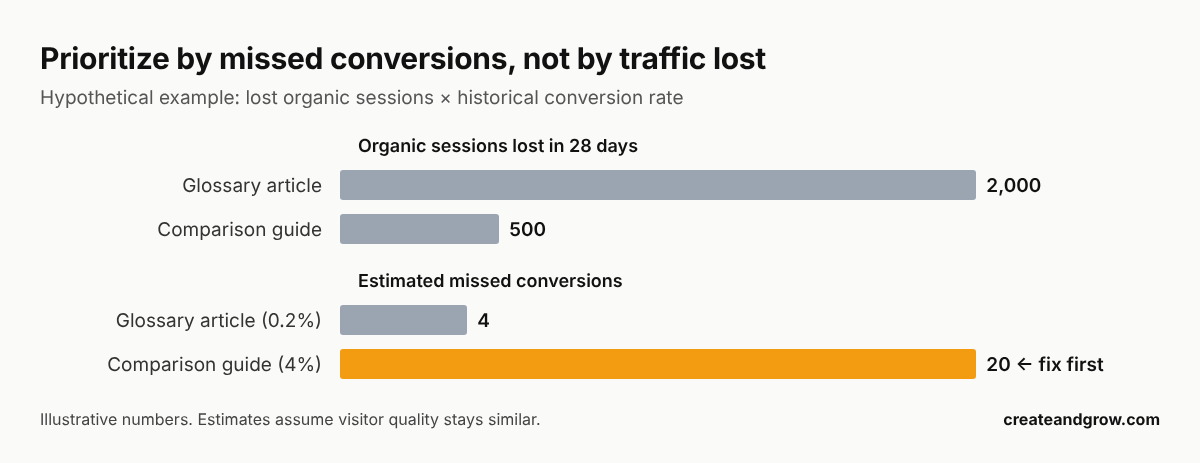
For prioritization, multiply lost organic sessions by the page’s historical conversion rate. A hypothetical guide losing 500 sessions at a 4% rate represents 20 estimated missed conversions; a glossary losing 2,000 at 0.2% represents four. These estimates assume visitor quality remains similar, so they guide investigation rather than prove lost sales.
A simple scoring sheet
Put every declining page into one spreadsheet with these columns, then sort by the last one:
| Column | Where it comes from | Example |
|---|---|---|
| Clicks, last 28 days vs. previous 28 | Search Console, Pages report | 310 vs. 820 |
| Same 28 days last year | Search Console, compare mode | 790 |
| Organic sessions lost | Analytics, organic landing pages | −500 |
| Historical conversion rate | Analytics, key events by landing page (last 6–12 months) | 4% |
| Value per conversion | Your CRM or average order value | €250 |
| Estimated monthly value lost | Sessions lost × rate × value | €5,000 |
Pages that link into your money pages deserve a second look even if they convert poorly themselves. If an assist page loses traffic, fewer readers reach the page that sells. Check that with a landing page path or “next page” report.
Separate Visibility Loss from Click Loss
A page can lose clicks because fewer people search, its rankings fall, or its listing attracts less attention. These problems can produce similar totals but need different responses. For example, an article may hold its position while an AI summary answers the reader’s basic question before they visit.
Compare Queries Before Changing Content
Search Console shows impressions, the number of times your result appears, and click-through rate, the share of impressions producing clicks. You can filter a declining page and compare its main queries across matching countries and devices.
Falling impressions do not prove falling demand because weaker visibility also reduces impressions. You can compare several established pages covering the same topic and check seasonal patterns. This broader comparison helps you avoid rewriting a useful page because interest temporarily fell.
Google Trends is a quick second check: if interest in the main query fell by a similar share in the same months, the page is probably fine and the market moved.
Inspect the Results Your Readers See
Stable impressions with fewer clicks suggest a click-through problem, but average position can hide changes between queries. You can review individual searches and note whether competing results, advertisements, or AI summaries change the page layout.
A specific title can help readers recognize your page’s value. For example, a guide with tested email templates has a clearer reason to earn a visit than another generic outreach overview. The title should describe content you actually provide, because misleading promises weaken trust.
When an AI Overview sits above your result, the goal shifts to being one of the sources it cites. Seer Interactive found cited brands get 120% more clicks per impression than uncited ones. Our breakdown of how Google AI Overviews choose sources explains what tends to get a page cited, and our list of AI search monitoring tools shows how to track it.
Quick diagnosis table
| What you see in Search Console | Most likely cause | First thing to check |
|---|---|---|
| Impressions down, position stable | Less demand or seasonality | Google Trends and last year’s same period |
| Impressions down, position down | Lost rankings | Competing pages, content freshness, links, recent site changes |
| Impressions stable, CTR down, position stable | Results page changed (AI Overview, ads, video, forums) | Search the main queries yourself on mobile and desktop |
| Clicks fine, conversions down | Wrong visitors or a broken page path | Forms, CTAs, page speed and tracking |
| Everything fell on one date | Technical or tracking issue | URL Inspection, redirects, robots rules, analytics tag |
Match Your Fix to the Evidence
A content refresh cannot repair every decline. Your guide might contain outdated pricing, miss the reader’s current question, or become inaccessible after a recent website update. A redesign could also remove useful internal links, links between pages on your website, making an important page harder for readers and search engines to find.
You can check whether Google still indexes the page, meaning it includes the page in its searchable collection, through Search Console’s URL Inspection tool. If the decline follows a release, your developer can check accidental indexing restrictions and broken redirects, which should send visitors to another address.
Your team can also check mobile rendering, or content display on phones, before rewriting. This order addresses access failures first.
For content problems, you can compare your examples with the questions readers now ask. Updated screenshots, clear limitations, and original experience give visitors practical reasons to stay. Health or financial content also needs qualified review because errors can affect important decisions.
Relevant internal links can restore useful routes from related articles. If you run WordPress, our guide to WordPress internal linking shows a quick way to add them. Backlinks, links from other websites, deserve a relevance check before further outreach; a backlink audit shows whether the page lost relevant backlinks or picked up toxic ones. More links cannot correct an inaccessible page or an article that answers the wrong question.
Fix in this order
- Access: indexing, redirects, robots rules, canonical tags, mobile rendering.
- Tracking: make sure the analytics tag and conversion events still fire on the page.
- Intent: does the page still answer what people search for today? Compare it with the current top results.
- Freshness: prices, screenshots, years, statistics and examples.
- Snippet: title and meta description that state the page’s specific value.
- Links: internal links from related pages first, then earned links from relevant sites.
If the decline is on product pages, our list of practical SEO tactics for product pages covers fixes specific to them. SaaS teams should also check the common SEO mistakes by SaaS startups, many of which show up as slow, quiet traffic loss.
Measure Recovery Without Creating New Problems
An early increase can tempt you to declare success, especially after several changes. However, seasonal demand or a tracking update can create movement that your edits did not cause. A page could also regain clicks while attracting fewer suitable buyers.
You can record each change, its date, and the intended outcome. A title change should be assessed through matched-query click-through rates; a content update also needs qualified conversions. A four-week review is a useful starting point, but low-volume pages need longer observation.
| Date | Page | Change | Metric to watch | Review on |
|---|---|---|---|---|
| 3 Nov | /comparison-guide/ | New title and meta description | CTR on the top 10 queries | 1 Dec |
| 10 Nov | /comparison-guide/ | Updated pricing table and screenshots | Qualified demo requests from the page | 8 Dec |
| 10 Nov | 4 related posts | Added internal links to the guide | Sessions entering via those posts | 8 Dec |
Make one kind of change at a time on a given page where you can. If you change the title, content and links in the same week, you will not know which one worked.
Keyword stuffing and irrelevant link campaigns introduce risk instead of solving the reader’s problem. You can protect quality by linking naturally and making every added paragraph useful. If you do build links to a recovering page, judge them by return beyond rankings, not by the number of links.
A 60-Minute Traffic Loss Audit Checklist
- Export page-level clicks and impressions from Search Console: last 28 days, previous 28 days and the same period last year.
- Export organic landing-page sessions and conversions from your analytics tool for the same periods.
- Tag each page as a money, assist or reach page.
- Calculate estimated missed conversions (sessions lost × historical conversion rate) and sort by it.
- For the top five pages, check impressions, position and CTR by query to separate visibility loss from click loss.
- Search the main queries yourself and note AI Overviews, ads, videos and forum results.
- Run URL Inspection and check redirects, canonical tags and mobile rendering.
- Pick one fix per page, log it with a date and a review date.
- Review after four weeks (longer for low-traffic pages) using matched queries and qualified conversions.
FAQ
How do I find which pages are losing traffic in Google Search Console?
Open Performance, then Search results, choose Compare and select the last 28 days against the previous 28 days. Switch to the Pages tab and sort by the click difference. Repeat with the same period last year to rule out seasonality.
Why is my traffic dropping when my rankings are the same?
Usually because the results page changed. AI Overviews, ads, videos and forum results can push your listing down or answer the question before anyone clicks. Ahrefs measured a 58% lower click-through rate for the top result when an AI Overview appears.
Which lost pages should I fix first?
Fix the pages with the highest estimated missed conversions, not the biggest traffic drop. Multiply sessions lost by each page’s historical conversion rate and start at the top of that list.
How long does it take to recover lost organic traffic?
Review each change after about four weeks. Pages with low traffic need longer, often two to three months, before the data is reliable. Technical fixes such as broken redirects can show results faster.
Should I build more backlinks to a page that is losing traffic?
Only after you rule out access, tracking and intent problems. Links help a page that already answers the right question. They cannot fix a page Google cannot index or one that no longer matches what people search for.
Our best recovery work brings suitable people back to pages that help them decide. Higher traffic is valuable when relevance, transparency, and a better experience improve alongside it.
Related Reading